


 ChatGPT
 Gemini
 AI Overviews
 Perplexity
 Claude


 You
 Origin Investments
 Ashcroft Capital
Everything here lives in Settings → Plan & Usage.
The trial and the first charge
Your trial runs 7 days. You pick a plan and enter a card at the end of onboarding, after you've seen your Report Card, your competitors and your first article. The card isn't charged during the trial.
It converts automatically on day 8 to the plan you picked. You get two emails before that happens: one three days before the charge, and one the day before it. Both quote the exact amount, taken from the invoice itself rather than the list price, so tax and any promotion code are already in the number you read.
Cancelling before day 8 costs nothing and takes a minute.
Upgrading
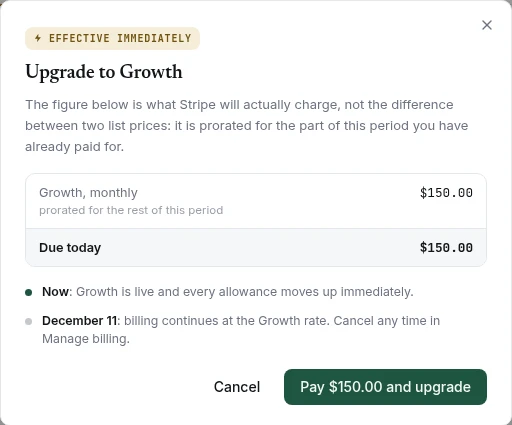
Upgrades take effect immediately, and you're charged the prorated difference for the rest of the current period straight away.
Before anything is charged, a preview shows the exact amount. That figure is pinned: the charge is calculated from the same instant you were quoted, so the number you agree to is the number on your statement.
Your billing date doesn't move when you upgrade, and your allowances don't reset. You get the new plan's limits for the remainder of the period you're already in.
Downgrading
Downgrades take effect at the end of the period you've already paid for, not immediately. You keep what you bought until it runs out.
If the smaller plan doesn't fit what you currently have, Verand shows you exactly what happens before you confirm, and lets you choose:
- Sites beyond the new plan's limit are paused, not deleted. You pick which ones stay active; by default the ones with the most published content are kept.
- Team members beyond the new seat count become read-only, not removed. You pick who keeps full access.
- Tracked keywords, AI-visibility prompts and competitors beyond the new caps are paused rather than deleted, along with all their history.
Nothing is deleted by a downgrade. If you upgrade again later, the paused items come back exactly as they were.
A scheduled downgrade can be called off any time before it takes effect.
Cancelling
Settings → Plan & Usage → Manage billing, then cancel on the billing page that opens. No conversation, no retention call. The same page holds your payment method, invoices and receipts.
You keep full access until the end of the period you've paid for. After that the account stops running scheduled work, and your content and data stay where they are.
Export anything you want to take with you. Your articles export as Markdown, HTML, Word or PDF on any plan, at any time.
When you hit a limit
The message tells you which ceiling you hit, your trial's or your plan's, because they mean different things. Hitting the trial cap on Growth means 20 articles unlock when you convert. Hitting the plan cap means you're at what you bought, and the next plan up is the way past it.
Verand never buys you more capacity automatically, and it never charges you for going over. It stops and tells you.
Cards, invoices and tax
Card details, billing address, tax details and every past invoice live in the Stripe customer portal, reachable from Settings → Plan & Usage.
Verand doesn't store your card. It never touches our systems.