


 ChatGPT
 Gemini
 AI Overviews
 Perplexity
 Claude


 You
 Origin Investments
 Ashcroft Capital
WordPress author bio plugin: Every author signal Google's raters look for, from one plugin.
Verand Author Bio Pro puts a credentialed byline, a reviewer, a real author page and a connected schema graph on a WordPress site. One install, one settings screen, no developer.
One licence key, one site, billed annually. Your key arrives by email. There is no account and no dashboard to log in to.
Already a Verand customer? Check your plan first. It is included on Professional, Agency and Managed, and an add-on inside your existing subscription on Starter and Growth.
@id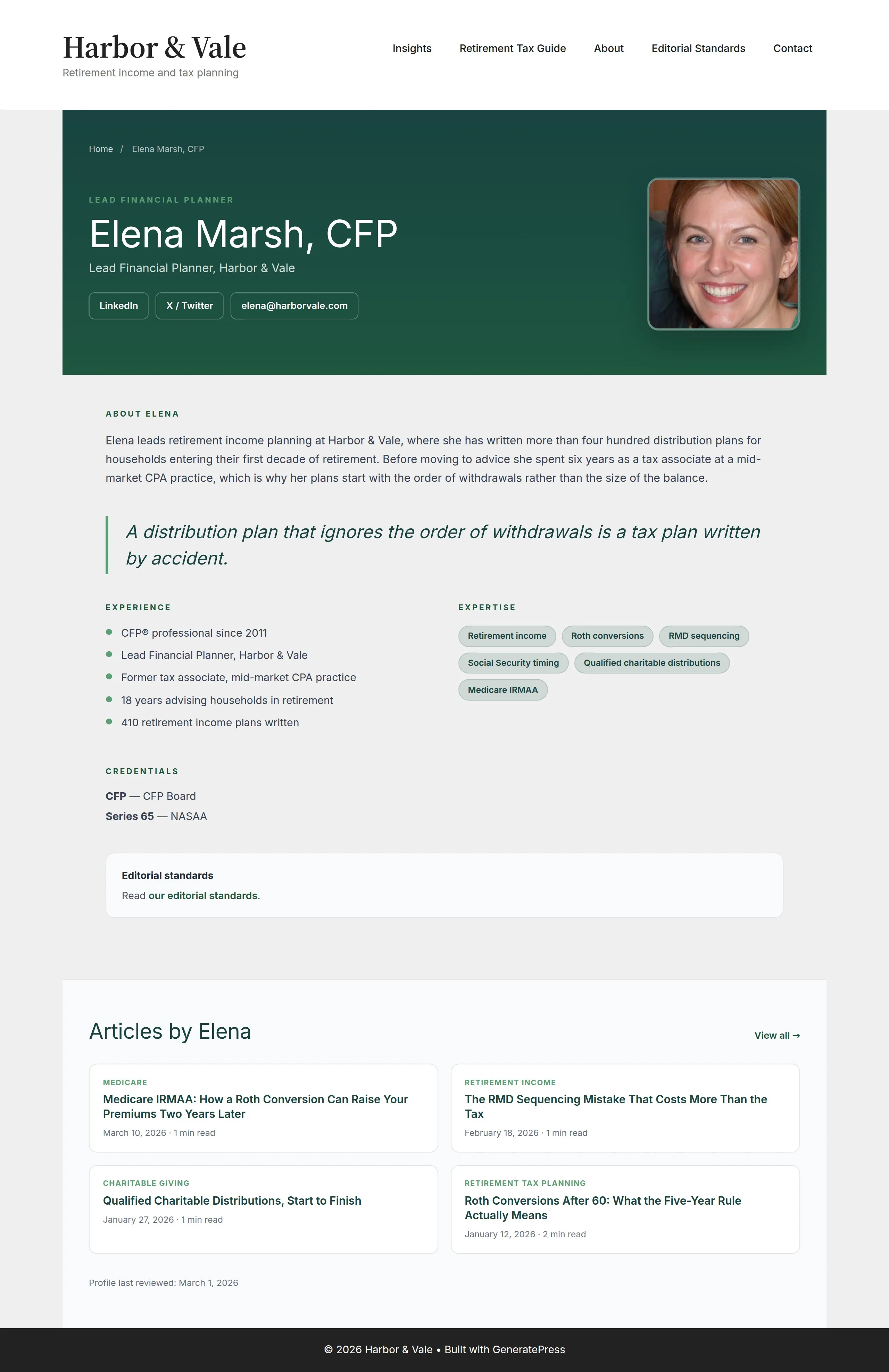
The author page, not the author box
Author-bio plugins append a small box to the end of a post. WordPress itself gives you an author archive with no bio, no credentials and no design. Neither is the surface a reader checks before deciding whether to trust advice about their money or their health.
- Hero with role, organisation and contact links
- Long bio, experience list and expertise pills
- Structured credentials that also become
hasCredential - Featured pull quote and an editorial-standards statement
- Articles by that author, and a last-reviewed date on the profile itself
The page emits ProfilePage with the author's body of work in workExample.
Seven things arrive with the activation
Nothing here is a second purchase or a companion plugin.
A full author page, not a box
WordPress gives you a bare author archive. The plugin replaces it with a page at /author/{slug}/ carrying a hero, long bio, experience, expertise, structured credentials, a pull quote, an editorial-standards statement and the author's recent articles.
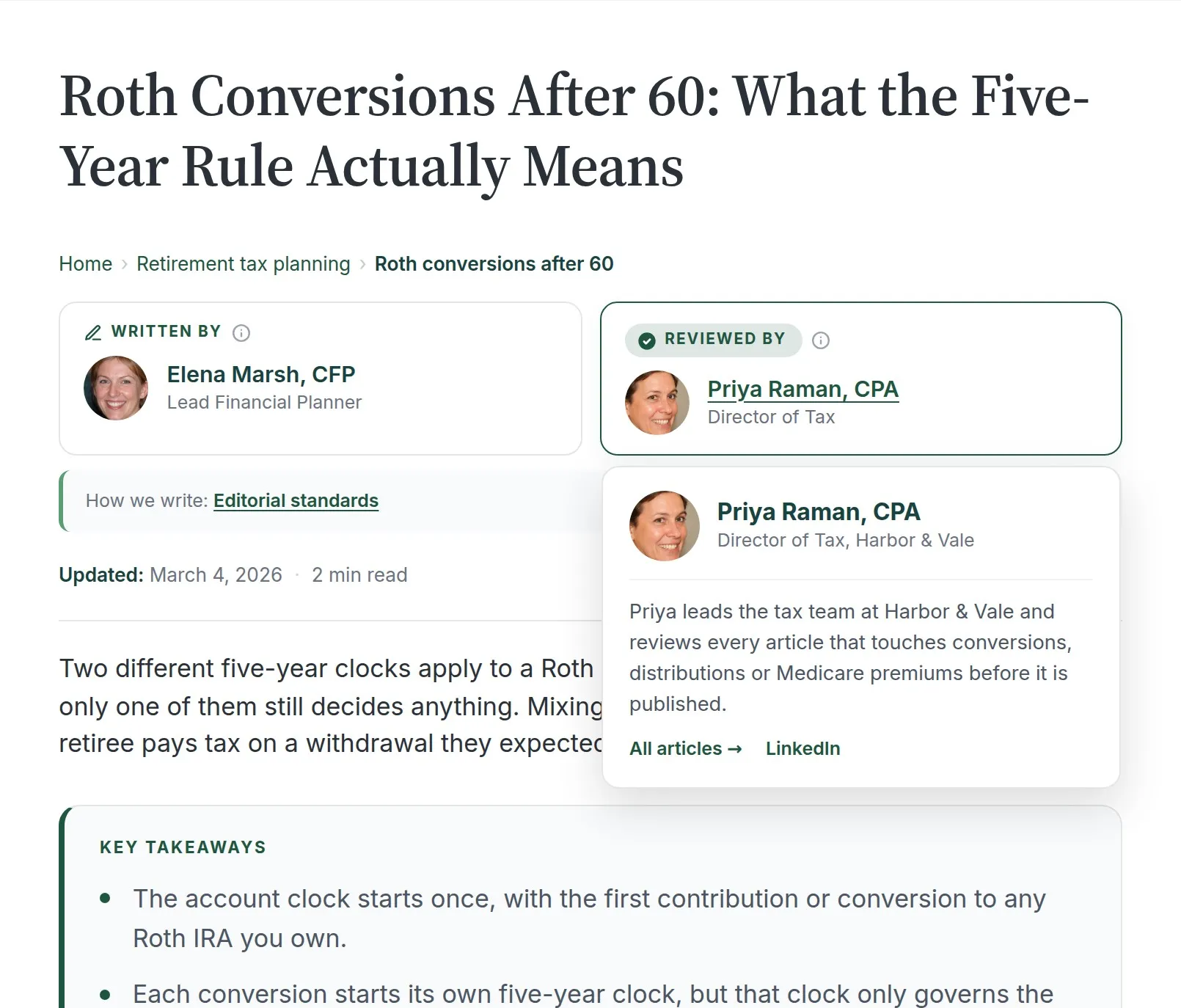
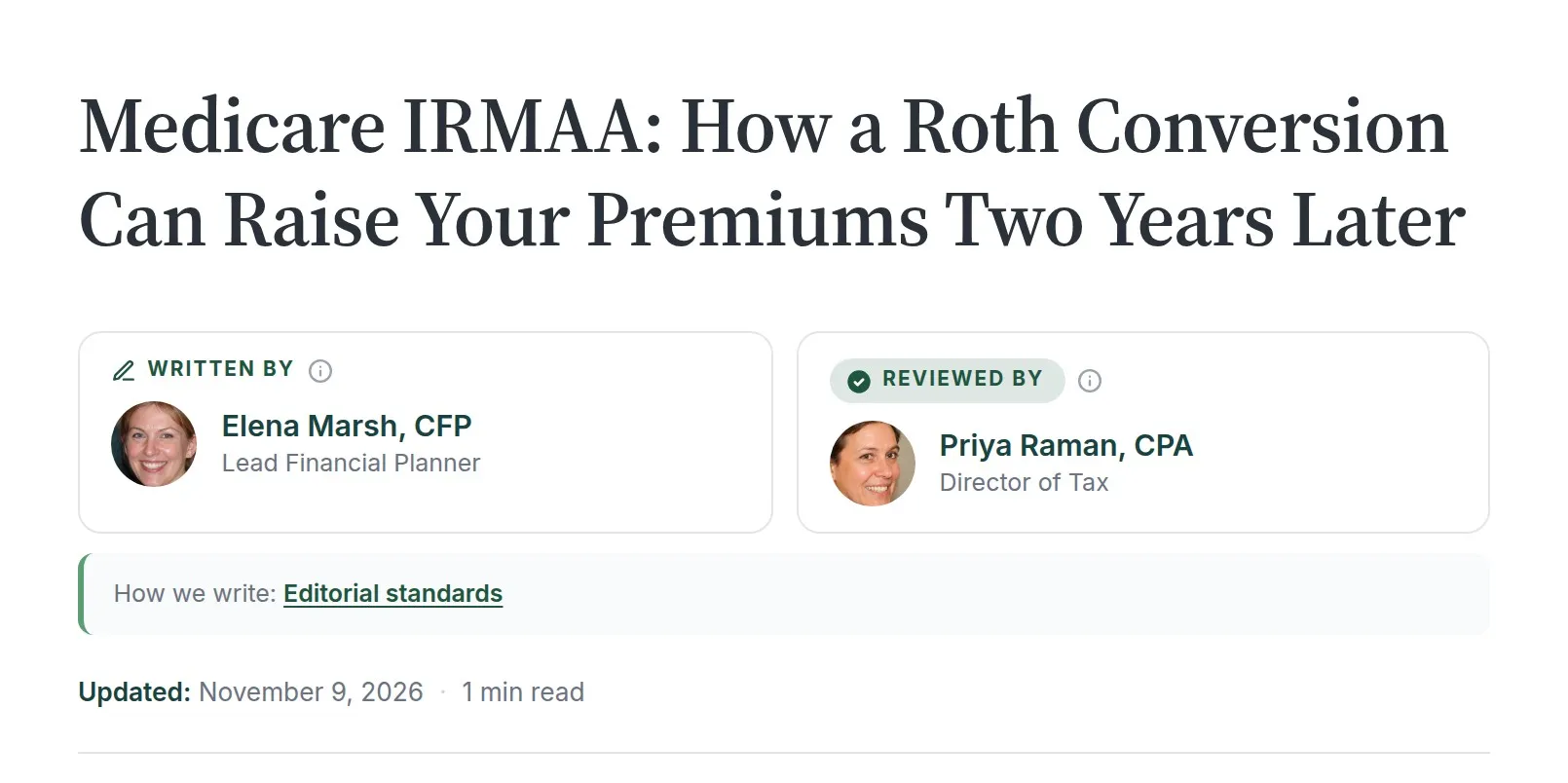
Written by and Reviewed by
A byline card with both roles, rendered from one PHP path whether it arrives as a block, a shortcode or an auto-inject. Labels are editable, so a medical site reads Medically reviewed by and a firm reads Legally reviewed by.
Schema that connects
Person, Article, ProfilePage, Organization, WebSite, BreadcrumbList and FAQPage, cross referenced by @id. Reviewers map to editor, the slot that is valid on Article, and the editorial-process page attaches as publishingPrinciples.
Content blocks in both editors
FAQ, Table of Contents, Key Takeaways, Pillar Card and Citations, each a Gutenberg block and a native Elementor widget over one render path, so the markup and the schema never drift apart. The breadcrumb is an Elementor widget and, in the block editor, a sidebar panel.
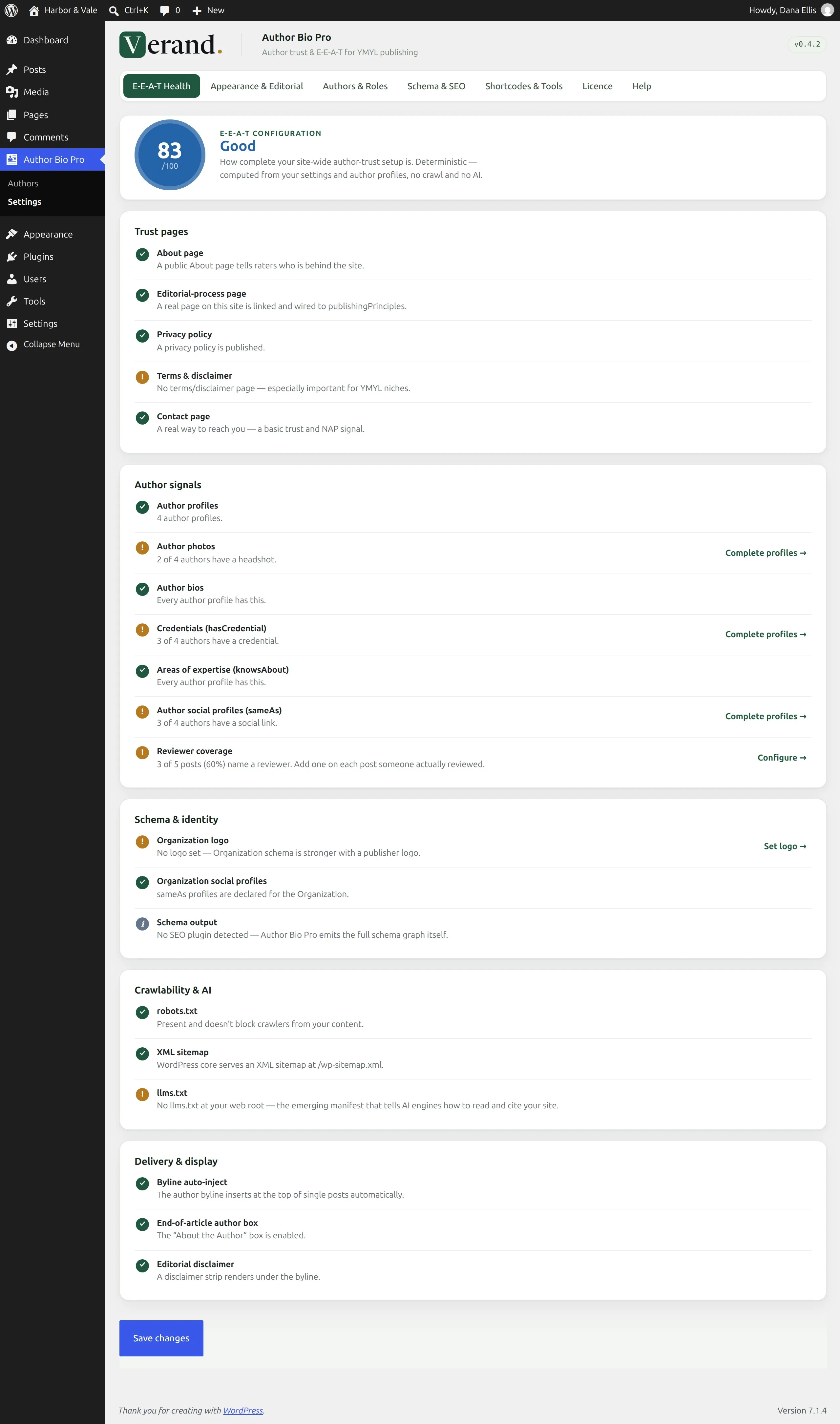
An E-E-A-T Health score
A deterministic configuration audit with a score out of 100. No crawl and no model call: it reads your real settings and content across trust pages, author signals, schema, crawlability and delivery. Every gap links to the setting that closes it.
Built for the sites that carry a licence
Financial advisors, law firms, medical practices, accountants and real-estate sponsors. The reviewer workflow, the credential fields and the editorial-process wiring exist because those are the signals quality raters look for on this kind of content.
A preferred-source badge for Google
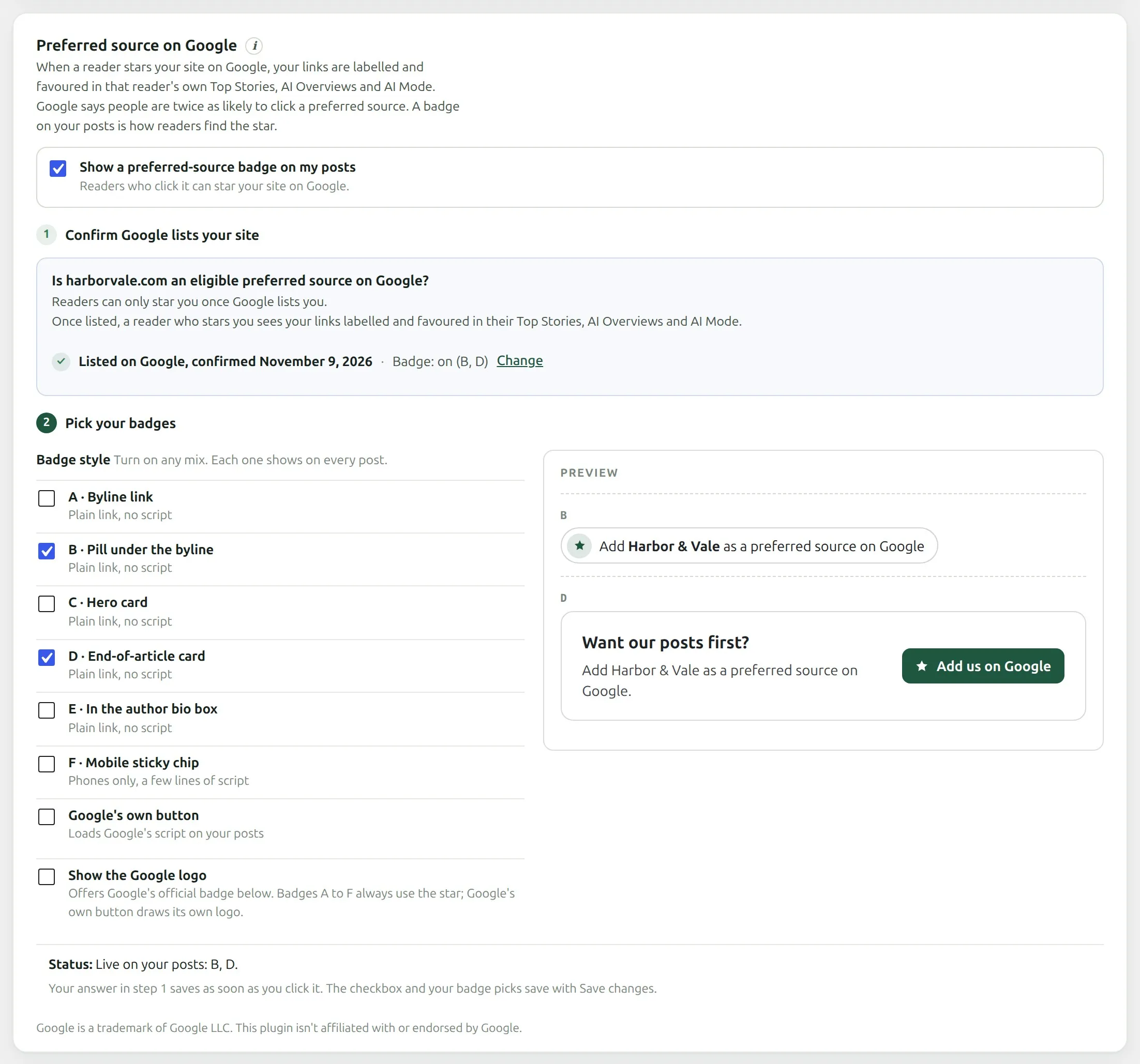
Readers can add your site as a preferred source on Google straight from a post, so your links are labelled and favoured in their own Top Stories, AI Overviews and AI Mode. It changes that reader’s results, not anyone else’s. The badge is opt-in: it only turns on after you confirm Google lists your site and pick the badges you want.
A score, then the exact setting that raises it
The E-E-A-T Health tab is the first thing the plugin shows. It is deterministic: no crawl, no model call, just your real settings and content. Every failing row links to the field that resolves it.
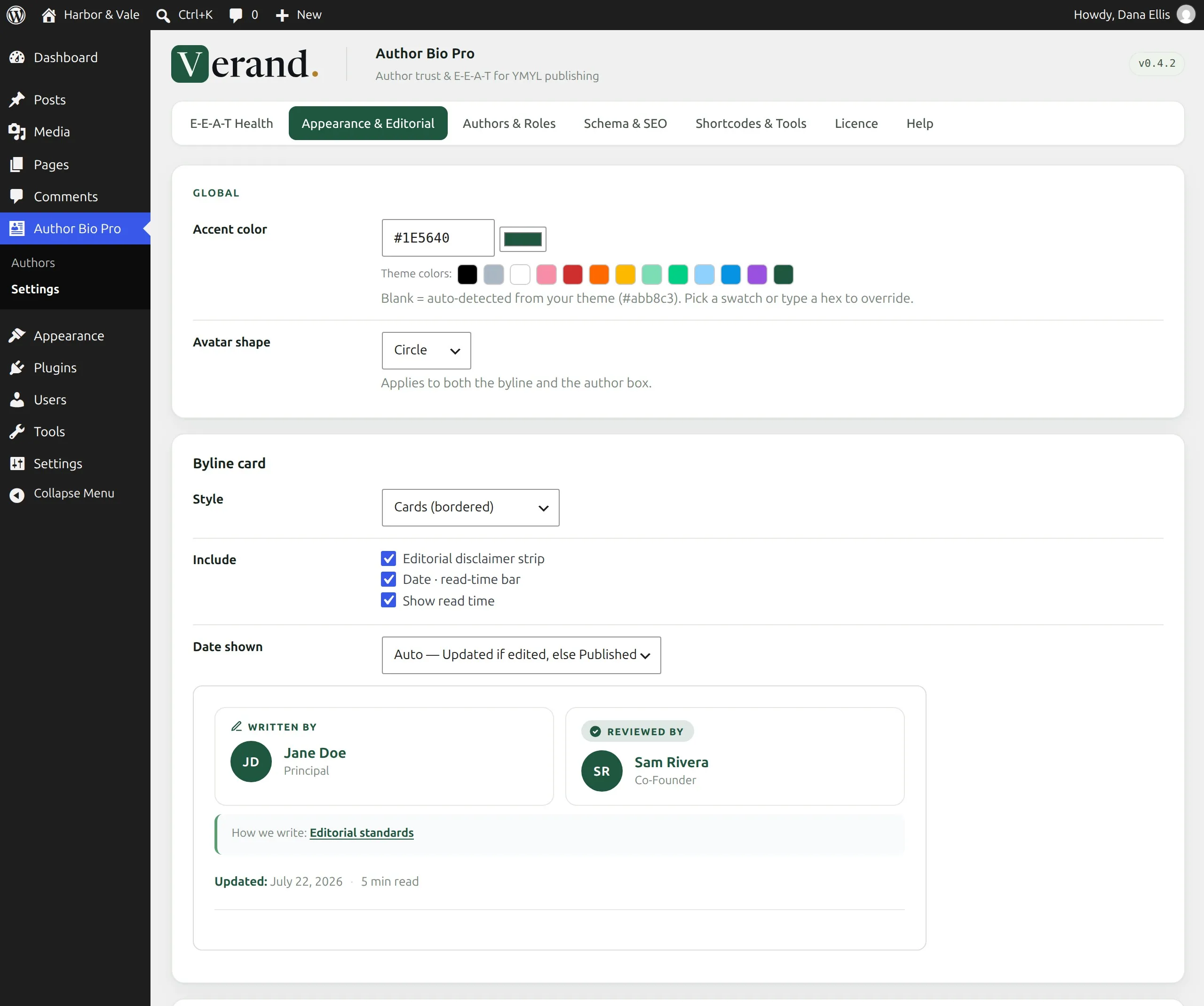
Presets, not a control panel
Six byline styles, six author-box styles and three avatar shapes, each with a live preview. The accent colour is read from the active theme, so the card looks like part of the site. The visible role labels are yours to write: Medically reviewed by, Legally reviewed by, Fact-checked by. The label changes the card, never the schema slot.
The author record is a form, on purpose
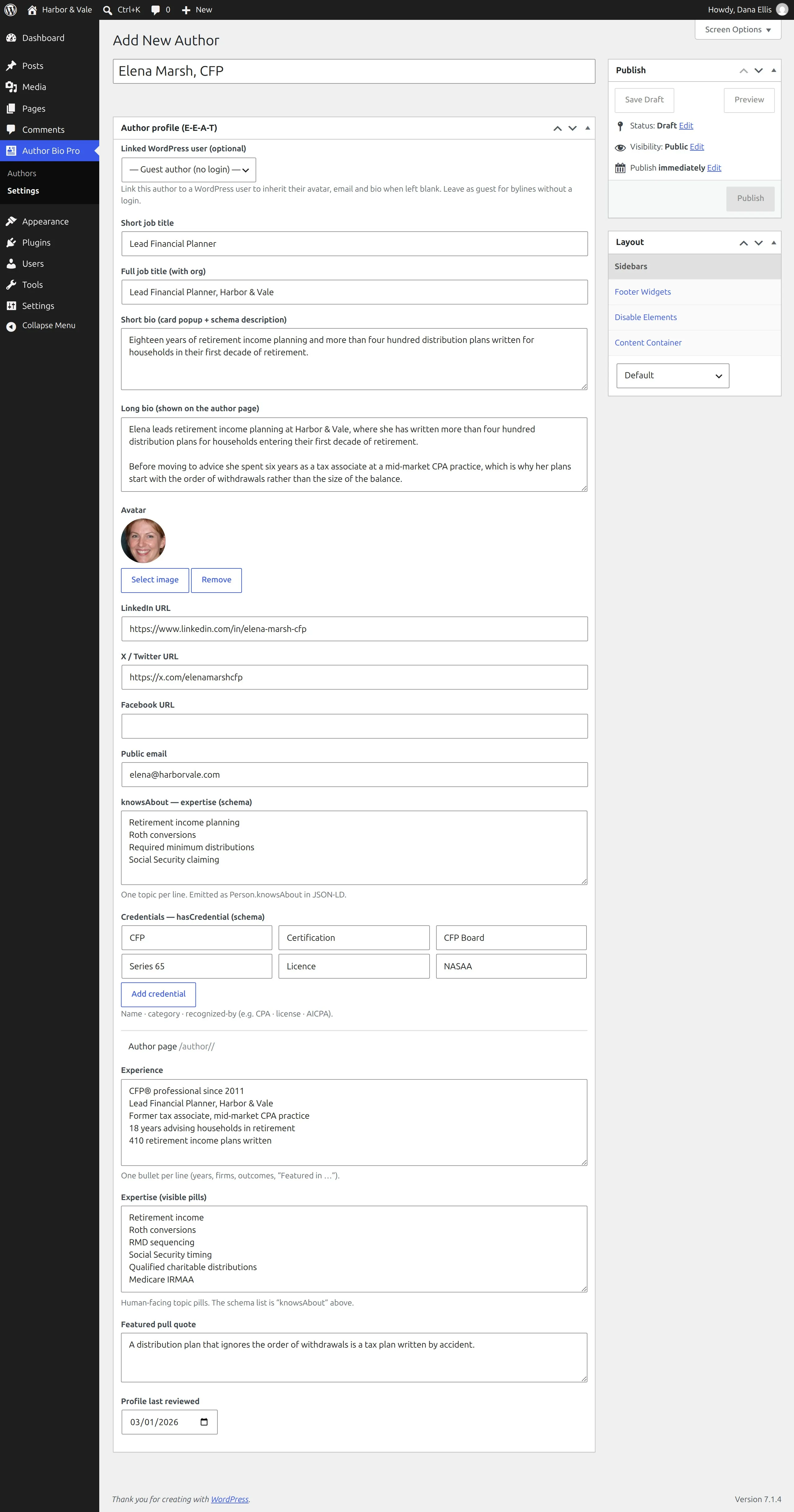
The block editor is switched off for author records, so adding a person is a focused profile form rather than a blank canvas asking you to choose a block. Guest authors need no WordPress login, which is what you want for a reviewer or an outside expert.
- Credentials as name, category and recognised-by, feeding
hasCredential - Expertise kept separate from the visible pills, feeding
knowsAbout - Link a profile to a WordPress user, or import your users in one click
Place it, or let it place itself
The byline and the author box can inject automatically on posts, or be placed by hand. Authors and contributors are set in the editor’s Author (Verand) panel, where the reviewer is a contributor with the Reviewer role, and the site-wide reviewer strategy can fill one in on its own.
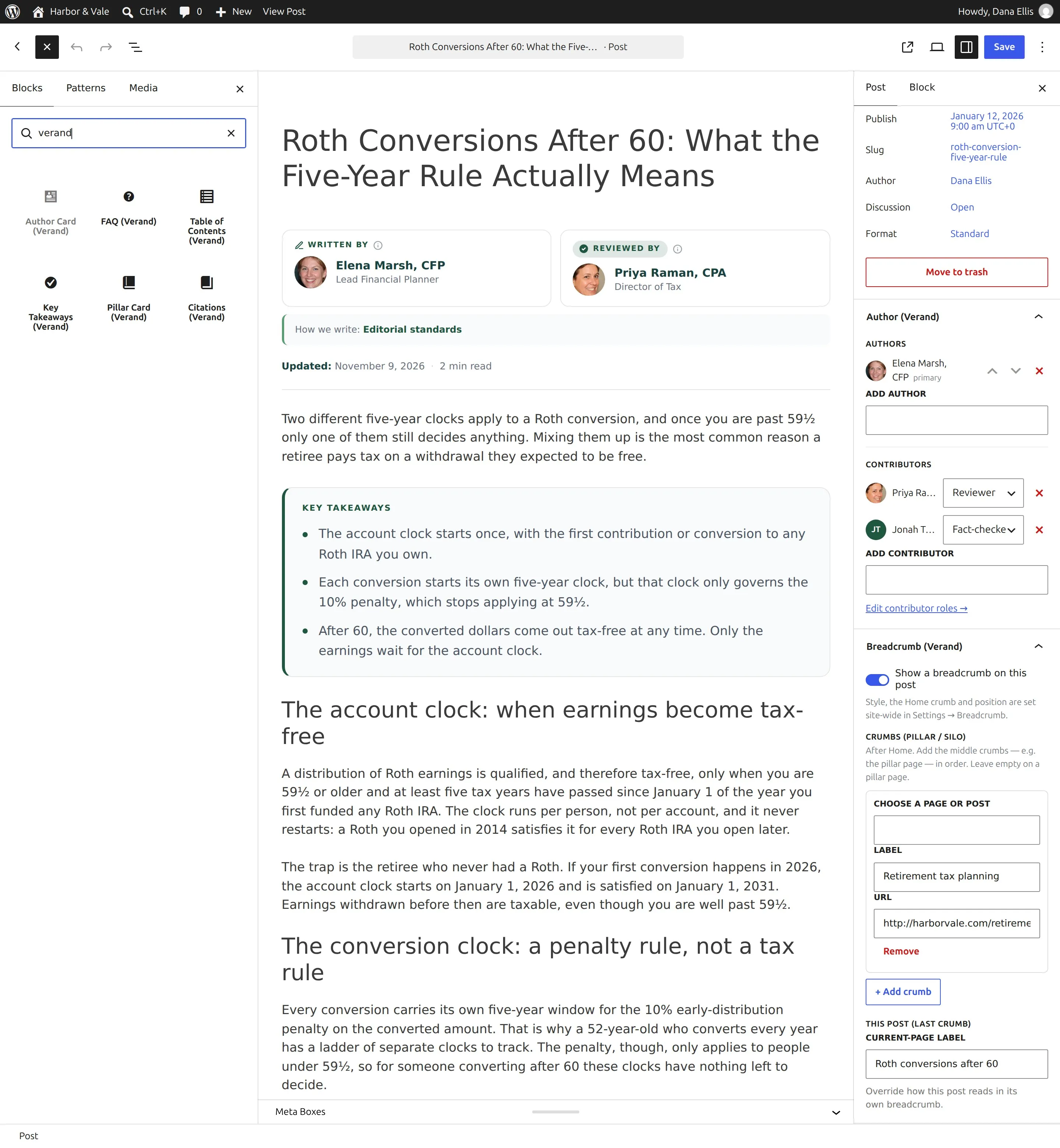
Verand fills in the byline
Publish from Verand and the post arrives with its writer and reviewer already set, taken from your Brand Hub. The plugin renders them as Written by and Reviewed by cards, with the schema behind them, and nobody opens a sidebar.
 WordPress plugin
The WordPress plugin that renders your author bylines, "Reviewed by" credit and full author pages with Person and credential schema. Current version 0.4.2.
- “Written by” byline on every post, with a bio popover for the writer.
- Your editorial standards, linked under every byline.
- “Reviewed by” credit for the person who checked it, with their own popover.
- An About-the-author box at the end of each post.
- A custom author page for each person, with their credentials and articles.
Verand sets the writer and reviewer on every article it publishes, so nobody fills these in by hand.
vabp_7c41a••••••••••••e90bOne key for all your sites: enter this same key in the plugin on each site, and it uses a seat below.- willowdaleequity.comlast seen 11/8/2026


Your licence, in Plan & Usage
On Verand, the Author Bio Pro licence sits in Settings, Plan & Usage: the key, the sites it's active on, the current version and the download, so there’s no second account to keep.
The preferred-source badge, set up in two steps
Readers who star your site on Google see your links labelled and favoured in their own Top Stories, AI Overviews and AI Mode. The plugin checks that Google lists your site, then lets you pick which badges show on your posts, with a live preview beside them.
One graph, and the reviewer in the valid slot
Most manual setups put the reviewer in reviewedBy. It is not valid on Article and it fails Google's Rich Results test. The plugin uses editor, keeps the display label separate from the schema slot, and links people by @id rather than as strings.
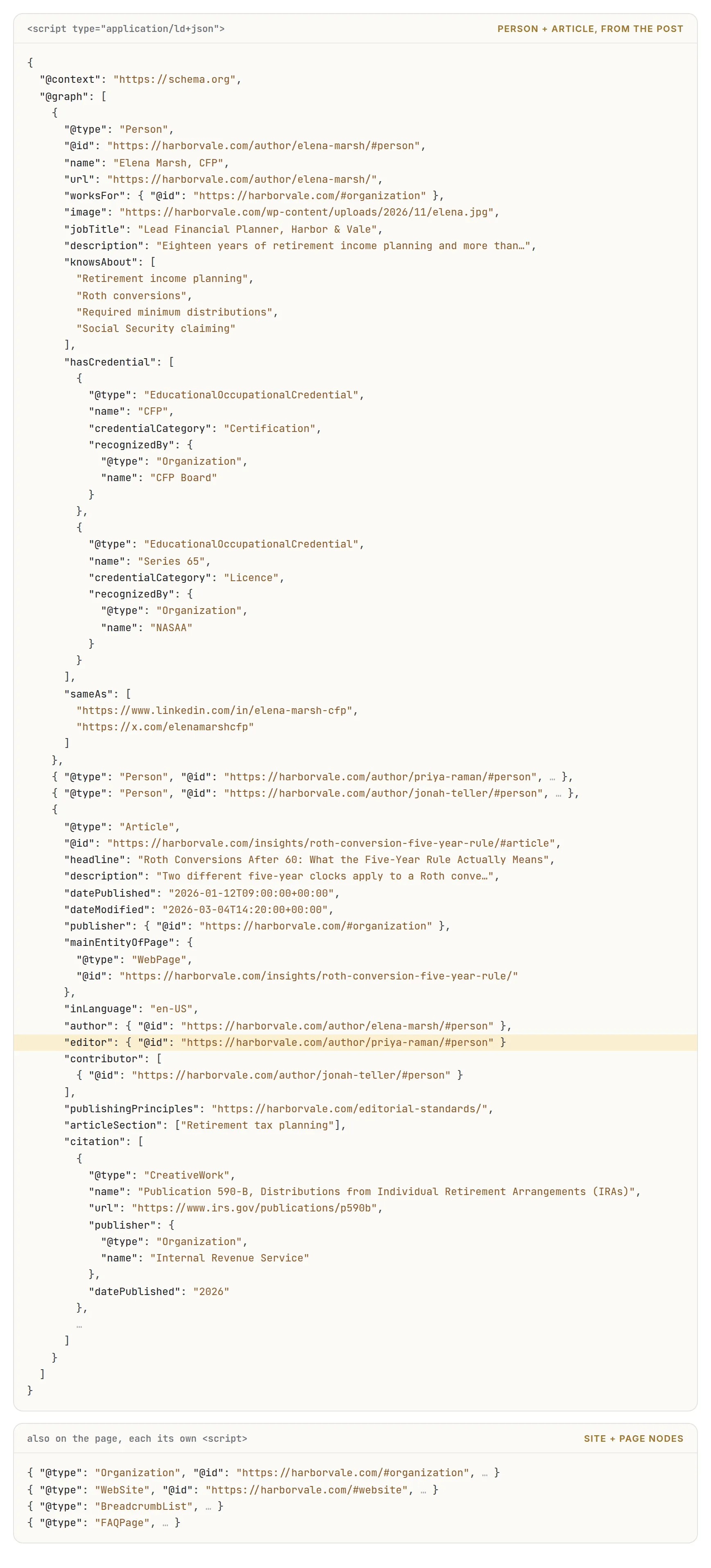
Where each piece comes from
hasCredentialfrom the credentials repeater on the authorknowsAboutfrom the expertise field, kept separate from the visible pillseditorfrom the reviewer, whatever the label sayspublishingPrinciplesfrom your editorial-process pagecitationfrom the Citations block, in either editordateModifiedfrom the same field that prints the meta bar
It joins the site you already run
The plugin is written to complement what is already installed rather than compete with it.
 Gutenberg blocks
 Elementor widgets
[eabp_author_card]
[eabp_author_box]
 Yoast SEO
 Rank Math
No SEO plugin
Two routes to the same plugin
Buy it for a WordPress site on its own, or add it to the Verand subscription you already have. The higher Verand plans include it.
Billed annually, which is how the WordPress plugin market works. Updates and the licence server included. One licence key, one seat per site.
- Every feature on this page
- Licence key, zip download and its own update channel
- Deactivating a site frees its seat and keeps the key, so moving a site never burns the cap
- If a payment fails, your site keeps showing everything while you fix the card. If you cancel, your author pages stay live and nothing is deleted; renew and the rest comes back.
On Professional, Agency and Managed it is already included, so buying it here would be paying twice. On Starter and Growth it is an add-on inside the subscription you already have, at the interval you already pay, and it lands on your existing invoice rather than making a second one. Each unit covers two sites.
- Included on Professional, Agency and Managed, across every site those plans cover
- Licence key and download in Settings, Plan and Usage. No separate checkout
- The Verand publisher sends the body and sets the writer and reviewer; the plugin renders the byline and owns the schema
Bought it here and subscribed to Verand later? On Professional and above the licence is absorbed automatically: the unused part of the year is refunded, the standalone renewal stops, and the key you already have keeps working, so the WordPress sites using it never need touching.
An included licence covers exactly the sites the plan covers. Prices are USD.
The ones that decide it
What schema do the Written by and Reviewed by cards produce?
Your author becomes a Person node carrying jobTitle, knowsAbout, hasCredential, sameAs and worksFor, and the article links to it by @id rather than as a plain string. Your reviewer becomes a second Person node linked as Article.editor. We deliberately use editor and not reviewedBy, which is not valid on Article and fails Google's Rich Results test.
How do I buy it, and what does the key cover?
Standalone it is $139 a year for one site, paid annually. You get a licence key and the zip, and the key activates that site against the licence server. Deactivating a site frees its seat and keeps the key, so moving to a new host or a new domain never burns the cap. If you are already on Verand it is included on Professional, Agency and Managed across every site those plans cover, and an add-on at $15 a month or $139 a year on Starter and Growth, where each unit covers two sites.
Is there a free trial?
No. There is one purchase route standalone and one entitlement route inside Verand, and nothing on this page is gated behind a trial period.
Will this duplicate the schema my SEO plugin already emits?
No. In the default Integrate mode the plugin injects your author, reviewer, contributor, credential and editorial-principles data into Yoast's or Rank Math's existing graph, so you end up with one enriched Article node. Standalone mode emits the full graph only when no SEO plugin manages schema, or when you choose it in Settings, Schema and SEO.
Do my authors need WordPress logins?
No. Authors are guest profiles by default, which suits reviewers and outside experts who should never touch your dashboard. You can link a profile to a real WordPress user to inherit their details, or import your existing users as authors in one click.
Can I change Reviewed by to Medically reviewed by?
Yes. The reviewer label is editable and it updates the visible card and the schema together. Contributor roles can be renamed and extended too: editor, fact-checker, researcher, illustrator, photographer, translator.
Does it work with Elementor?
Natively. All eight, the Author Card, Author Box, Breadcrumb, FAQ, Table of Contents, Key Takeaways, Pillar Card and Citations, are real Elementor widgets under a Verand category, on the same render and schema path as the block editor.
What happens to my site if the licence lapses?
If a payment fails, everything keeps showing on your site and you can still pick a post's authors; the plugin's settings and author profiles are locked until the card is updated. If you cancel, bylines, author boxes, schema and badges turn off, your author pages stay live and nothing is deleted, and FAQ, Key Takeaways and Citations text stays on your posts as plain text. Renew and everything comes back on the next page load, on the same key. A licence check never runs on the front end, so a slow or unreachable licence server can't affect a visitor's page load.
What are the requirements?
WordPress 5.8 or newer and PHP 7.4 or newer, with PHP 8.0 or newer recommended. The plugin is delivered as a zip from your dashboard with its own update channel, so it is installed the way any plugin is.
Is this only for regulated sites?
It is built for them, but any site that cares about author credibility benefits. The signals simply matter more where a licence, a fiduciary duty or a professional reputation is attached to the byline.
How it works in the help center: Authors, bylines and Author Bio Pro
Give the byline something to stand on
Your authors, your credentials, your editorial process, rendered and structured on your own site. One licence key per site, and deactivating a site frees its seat and keeps the key.
Billed annually, one site per licence. Your key arrives by email, and there is no account to create.