Researched from the regulators' own text and tested by Verand. Not reviewed by a licensed attorney. Your counsel confirms applicability. Not legal advice.How we review →
Every update we ship now shows up inside Verand, so you can see what changed without leaving your dashboard.
A count that's yours: the What's new row in the sidebar shows how many updates you haven't seen yet, and teammates keep their own.
The latest first: the panel opens on the newest big update, then lists everything by month with what's included.
Straight to it: where there's something to try, a link takes you to the page in the app.
Find it: the What's new row, above Knowledge base & Help
November 26, 2026
Clearer GitHub settings
ImprovedSettings
The GitHub card in Settings is now a set of clear rows, each with its own button, so it's easy to see how your site is connected and change it.
One row per setting: Repository, Branch, Scheduled posts, Site layout and Connection each have their own row.
Real buttons: Re-detect and Disconnect are proper buttons, and scheduled posts use a simple switch.
Your publishing branch: owners and admins can choose which branch Verand publishes to, and a merge into a branch that isn't live says so.
Hero shape shown: Site layout shows the hero image shape Verand learned from your posts, or asks for a Re-detect.
Find it: Settings, then Integrations, then GitHub
November 26, 2026
New keywords follow your site's country
ImprovedKeyword tracking
Keywords you add are now tracked in your site's own country by default, and any other country you choose for a batch sticks.
Your country first: the toolbar and the Add box both open on your site's country.
Any country you pick: choosing another country, including the US for a site elsewhere, stays selected and the Add box follows it.
Local search data: search volume and difficulty for your keywords now come from your site's own country too.
Find it: Keyword Tracking
November 26, 2026
Also fixed
Fixed
Google AI answers are checked from your own country
Sites outside the US now see the Google AI Overviews and AI Mode answers their own customers see, not the US versions.
AI Visibility
Down to your city: a business with a local office has its Google AI answers checked from its own city.
A one-time shift: because these answers are now read in your country, your AI visibility trend may move once.
Find it: AI Visibility
Fixed
Regenerating an image survives a reload
Reload the editor while an image is being redrawn and its progress comes back, and the new image still appears when it's ready.
Editor
No false warning: the finished image no longer shows a "draft changed outside the editor" banner.
Hero tab in step: the Hero tab shows the redraw as busy too, and clears if a redraw fails.
November 25, 2026
Pages published in your site's own style
NewPublishing
On sites that publish through GitHub, new and updated pages now look like the rest of your posts, so a Verand article sits naturally beside the ones you wrote.
Matching images and tables: images and tables take your posts' own styling instead of the editor's sizes.
Headline highlight: if your headlines highlight a word or phrase, new headlines highlight the same part.
Heroes in your shape: hero images are drawn in the proportions your posts use.
Joins your post list: on sites that list their posts from a file, a new post is added to that list, so it shows up in your site's own search.
November 24, 2026
Sharper sources and internal links in new articles
ImprovedArticles
New articles cite their sources more accurately, link only to pages that exist on your site and keep facts and examples to your own market.
Citations that match: every numbered citation points to the right entry in the Sources list, and one that points at nothing is removed.
Original sources: a fact repeated by another site is credited to where it first came from, or written as "according to X, as reported by Y" when the original can't be confirmed.
Real internal links: articles link only to pages on your site that fit the topic, and leave a link out rather than invent one.
Your market: facts from another country's sites, or quoted in another currency, are left out.
November 24, 2026
Turn off images between sections
ImprovedBrand Hub
Body Image Style has a new Off option for sites that want a hero image and nothing else.
Hero only: with Off, new articles keep their hero image and skip the images between sections.
Your style is kept: your saved preset, colour and notes stay, so picking Styled again brings them back.
From your AI chat too: the Verand connector can switch body images off the same way.
Find it: Brand Hub, then Visual Guidelines, then Body Image Style
November 22, 2026
Ask your AI chat about live Search Console and GA4 data
NewAI connector
Through the Verand connector, Claude or ChatGPT can now read your live Search Console and Google Analytics data, so you can ask about any period and any breakdown.
Search Console, any window: searches, pages, countries, devices and dates across the last 16 months, compared with the previous period or the same dates a year earlier.
Google Analytics, broken down: totals or breakdowns by page, landing page, channel, source, campaign, location, device, event and AI assistant, across up to two years.
Conversions and visitors right now: count one named conversion event, and see who's on your site in the last 30 minutes and which pages they're on.
Read-only: these reads change nothing and don't use your plan's allowance.
Brand Hub now takes knowledge files up to 20 MB, so longer PDFs and documents upload in one go.
Larger files: PDFs, Word documents and other knowledge files up to 20 MB upload straight from the Knowledge Base.
Read like any other file: a large upload is read the same way, with its word count or the reason it couldn't be read.
Find it: Brand Hub, then Knowledge Base
November 17, 2026
Signing out no longer disconnects your AI chat
FixedAccount
Signing out of the dashboard no longer disconnects the AI chats and apps you've connected to Verand, so Claude, ChatGPT and your other connections keep working without reconnecting.
Only this browser: signing out ends your session on the browser you're using and leaves everything else signed in.
November 15, 2026
AI visibility results sooner during setup
ImprovedOnboarding
During setup, the AI visibility check now starts sooner and shows answers sooner, so you see how assistants describe you before you move on.
Starts sooner: the sample check begins as soon as its first prompts are ready, instead of waiting for the full set.
Answers sooner: results show as soon as they're in, rather than when the whole run finishes.
Progress you can see: a bar counts the answers as they arrive.
November 15, 2026
A sign-in page that remembers you
ImprovedAccount
The sign-in page now remembers the accounts used on this browser, so signing back in takes one click.
Your accounts listed: a Google account goes straight to Google, and an email account opens on the way it last signed in; remove one with its x.
Email link or password: tabs let you choose between an emailed sign-in link and a password.
Nothing secret kept: the browser remembers only the address and how it signed in, never a password.
November 13, 2026
Edit and delete chart annotations
ImprovedSEO Analytics
Notes you pin to your traffic charts can now be changed or removed, and you can mark off-site work beside your on-site changes.
Edit and delete: click one of your annotations to open it, then save your changes or delete it.
Easy to spot: your own annotations carry a faint pencil, while Google core update markers stay read-only.
Off-Site changes: a new group covers backlink building, press coverage, directory citations, link cleanup, Google Business Profile work, lost backlinks, social campaigns and third-party mentions.
Find it: SEO Analytics
November 11, 2026
Head-to-Head shows its progress
ImprovedAI Visibility
Head-to-Head comparisons now show what's happening while they run, and co-mention counts cover a full month of answers.
Steps while it works: clicking Analyze shows three steps, finding the answers, reading them and writing the summary, with a progress bar and the seconds so far.
30 days of co-mentions: "Named by AI engines alongside you" counts each brand across every answer in the last 30 days.
Your tracked competitors: Head-to-Head, share of voice and the rest of AI Visibility compare you with the competitors you track in Brand Hub.
Find it: AI Visibility, then Sentiment
November 10, 2026
Find competitors from your search results
NewBrand Hub
Discover from SERPs finds the companies that rank for your topics and sell something close to what you sell, so your list shows who you're really up against.
Judged against what you sell: publishers, directories and businesses in a neighbouring line of work are left out, while companies selling the same thing stay.
Results kept: the latest scan is saved and listed first with a Discovered from SERPs chip and the date it ran.
You see it working: a notice shows while it searches, and Show me takes you to the results when it's done.
Add in one click: add any company that fits straight from the list, with its authority shown on hover.
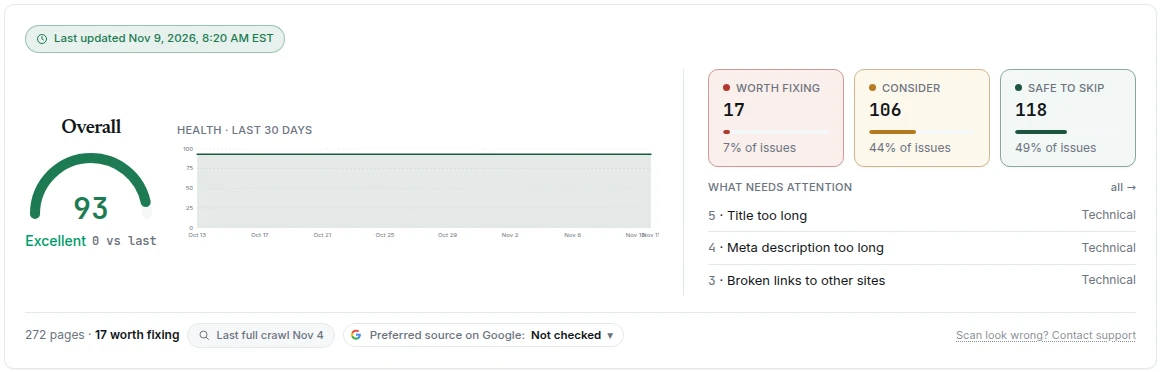
Site Health has an Audit History view that shows how your site's score has moved from one audit to the next.
At a glance: it opens on your score now, its change since your first audit and your best, above a daily trend chart.
One row per day: each row shows how the audit started (Scheduled, Run now or Automatic), pages scored, issues found, the score and its change, with extra runs on the same day tucked behind one line.
Hover for detail: hover or drag across the chart to see each day's score.
Find it: Site Intelligence, then Site Health, then Audit History
Home, Opportunities and AI Visibility now load noticeably faster, especially for sites with a long history.
Home fills in as it goes: each card appears as soon as its own data is ready, instead of the page waiting for the slowest one.
Quicker Opportunities: matching your pages against gaps and ideas does a fraction of the work it did, so the tab opens sooner.
Lighter AI Visibility pages: the answer log loads each full answer when you open it, so Mentions & Citations and Sources load far less up front.
November 7, 2026
Ask AI in the editor
NewEditor
The editor's AI tools now sit in one Generate with AI menu at every screen width, and it includes Ask AI, so you can ask for a change to any passage from one place.
One menu: Generate with AI holds the AI tools, while the formatting buttons beside it stay plain table, list and quote buttons.
Ask AI: highlight a passage, choose Ask AI and type what you want changed; the rewrite still goes through your compliance check.
What ranking is worth: the traffic value pop-up now leads with one number, the ad value of ranking, and shows new clients once you enter your conversion rate and what a client is worth.
Find it: Content, then Articles, then open an article
The Sentiment tab now shows how the way AI assistants talk about you changes from day to day, and compares you with a competitor on equal terms.
Daily sentiment bars: each day's positive share rises and negative share falls from a centre line, on the Sentiment tab, Overview and Home, with days resting on few answers faded.
Brand shape network: the qualities assistants link to you are drawn as a living network with competitors on the rim, and you can drag it and hover for the numbers.
Head-to-Head, counted: a competitor's sentiment is now counted from the answers the same way yours is, and the card marks which brand leads each measure.
Find it: AI Visibility, then Sentiment
November 6, 2026
Guided tours for every section
NewHelp
Each section's welcome now walks through its parts one row at a time, with a short animation drawn around your own site, so you see what each part does before you use it.
New tours: Articles, SEO Analytics and Scheduled Tasks now have tours of their own.
Deeper walkthroughs: the Topic Research, Keyword Tracking, AI Visibility, Brand Hub and article editor tours visit far more of each screen.
On phones too: the animated scenes play on small screens, with steps you can tap.
Help in one place: help links across the app open the help center at verand.ai/help.
November 5, 2026
New pages, linked and watched until indexed
NewOpportunities
Opportunities now opens with your newest pages, each with suggested links from your strongest related pages and a watch on whether Google has indexed it yet.
Pages from anywhere: pages you publish by hand, found in your sitemap daily, show up beside the ones Verand publishes.
Links you approve: suggested links are added only for the ones you tick and approve, and Link from another page covers a page you'd rather link from.
Request indexing: a page still waiting on Google gets Request indexing, which opens Search Console for you to submit it.
Done pages fold away: an indexed page moves to an Indexed list showing how long Google took.
Find it: Content, then Opportunities, then New pages
Site Health now shows which of your pages Google has indexed, checked daily through Search Console, so a page missing from search doesn't go unnoticed.
Indexing section: coverage across your pages, how long new pages took to get indexed and a list of pages that need attention.
Indexed column: Page Tracker shows each page's status in Google's own words, with what it means on hover, sortable and in the export.
Inspect and Check now: Inspect opens the page in Search Console, and Check now asks Google again on demand.
On Home: the content pipeline shows your average time to index, with a Watch item for new pages Google still hasn't indexed.
SEO Analytics now counts traffic on your own site only, not on other addresses that report into the same Google Analytics property, such as an app or a preview copy.
Your hostnames only: traffic from another domain is left out, and you decide whether each subdomain counts.
One question per subdomain: Settings asks once about each new subdomain your property tracks, with its recent sessions.
Conversions still count everywhere: sign-ups and other conversions count from every hostname, since they often happen off the main site.
Clear scope: a row above the cards shows the date range and what's left out, and cards that ignore the range are marked.
Find it: Settings, then Integrations, then Hostnames on the GA4 card
November 2, 2026
Opportunities leave out what you already cover
ImprovedOpportunities
Gaps and AI fan-out on Opportunities now leave out topics your site already covers, so every card is something you could write next.
Covered topics removed: a gap keyword you already rank for or have a page on, or a fan-out question a page already answers, no longer shows up.
Readable fan-out cards: each card has a suggested title, with the assistant's exact search quoted under it and the engine that searched it.
Dismissals remembered: dismiss a fan-out card with a reason and it stays gone.
Progress shown: a card you've made a brief or draft from moves to In progress, and sites outside the US get competitor data from their own market.
Find it: Content, then Opportunities
November 2, 2026
Cited sources show the real page
FixedAI Visibility
The Sources tab now lists the real pages AI assistants cite, so the pages you work to get named on are the right ones.
Real destinations: pages cited in Google AI Overviews, AI Mode and Gemini answers show where they actually point instead of a Google redirect, and Google itself no longer counts as a source.
One row per page: a page cited with different tracking tags, or linked to a quoted sentence, now shows as one row, including in past scans.
Find it: AI Visibility, then Sources
November 1, 2026
Products & services cards in Brand Hub
NewBrand Hub
Brand & Voice now holds a card for each product or service you offer, so articles describe what you sell the way you want.
Drafted from your site: after each deep crawl, Verand drafts cards from your product pages for you to approve, edit or dismiss.
Rules per product: each card holds what it does, its source page, the Knowledge Base item that covers it and its own rules for how articles mention it.
Site-wide rules: "How should articles mention you?" holds rules for every product, and they win over a card's own.
Re-learn adds, never replaces: Re-learn drafts new products beside your cards, and a draft that's part of an existing product is offered to that card.
Find it: Brand Hub, then Brand & Voice, then Products & services
Files and links in your Knowledge Base feed your articles
ImprovedBrand Hub
Documents, PDFs and links you add to the Knowledge Base are now read and used when Verand writes your articles, so your own material shapes every draft.
Files and links are read: Word documents, PDFs, text files and web pages are read, and earlier uploads catch up on their own.
Clear read status: each item says how many words were read, or why it couldn't be used, with a Read again button.
Editable notes: you can now edit a note's text, not just its title, and each note says whether articles can draw on it yet.
Full titles: cards show the whole title and a two-line preview instead of cutting names short.
Find it: Brand Hub, then Knowledge Base
October 2026
October 30, 2026
Deeper articles that match your brief
ImprovedArticles
Guides now go deeper and follow your brief more closely, so drafts need less reworking before you publish. The questions about your own experience are also the same in the brief, when generating and in your AI chat.
Fewer, deeper sections: related points are grouped under one heading instead of many thin ones, and a thin draft gets another pass to fill it out.
Your site's angle: each guide includes a point only your business can make, drawn from your Brand Hub.
Titles from the brief: the headline is the brief's title word for word, and the page title starts with it.
One Sources list: each article ends with a single Sources list, and your required disclaimer no longer lands mid-article.
October 26, 2026
Refreshes publish cleanly
ImprovedPublishing
A refreshed page now goes live with its own article only, so your site's header, footer and sidebar never appear on the page twice.
Your site's blocks kept: blocks your site repeats inside articles are left out of the draft and put back in place when you publish.
Your hero, your call: when you publish a refresh or full rewrite, choose whether the page keeps its current hero image or uses the new one.
The draft wins: the live page takes the heading, hero and sources from your edited draft.
Safe by default: if Verand can't separate the article from your site's template, it tells you rather than publish a broken page.
Find it: Articles, then a refresh draft, then Publish
October 25, 2026
Compare image styles for your hero templates
NewBrand Hub
You can now see how different image generators draw each of your hero templates side by side and keep the one you like, so heroes match your brand without trial and error.
Compare and pick: each template is drawn by several image generators on a real title, and the one you pick becomes its default.
Easier references: upload several reference images at once.
Matching body images: Verand suggests a body image style that fits your hero template, and nothing changes unless you accept it.
Redraw from the editor: regenerate an article's hero from any Brand Hub template, and template heroes never draw made-up statistics.
When you switch sites, every page and card reloads for the new site, so nothing briefly shows the previous site's numbers.
October 22, 2026
Comparison, list and how-to articles
NewArticles
Verand now writes the kind of article a search calls for, not only guides, so comparison and list searches get comparison and list articles.
Format and intent on the brief: briefs suggest a format and search intent from the top results, and you can change either.
New formats: Comparison, List, Alternatives and How-to articles, with facts about each option taken only from sources Verand checked, and "Not disclosed" where none says.
Tables: nearly every article now includes a table, with its figures sourced.
Formats at a glance: Topic Research cards show each idea's format, and Update facts on the Checklist tab refreshes a comparison or list from the latest research.
Search Console scans in Topic Research now show the evidence behind each find and keep their results, so you can trust what they suggest and come back to it.
Cleaner results: branded searches, past years, other languages and AI-style prompts are left out, and the scan says how many.
Evidence on every row: clicks, CTR and an intent estimate, with a line on why each search made the list.
Results that stay: the tab opens on your latest scan, and + Brief reuses an open brief for the same search.
Spot what you already have: Seed keyword and Paste / import tell you when your site already has a page on the topic, and the competitor gap table sorts on any column.
Find it: Content, then Topic Research
October 21, 2026
What this page needs
NewEditor
When you refresh a page, the editor now lists what your own data says it needs, from Search Console, analytics and your audit, so the refresh goes after real gains.
A section for a near miss: Fix adds a section for a search the page nearly ranks for, written in your voice.
Outdated figures: Verand proposes a current value only with a source and a quote, for you to Confirm one by one.
Titles and links: a better title and description, and live replacements for broken links.
All at once: Review & apply runs every fix in one go, any fix can be undone, and needs close once the page goes live.
Find it: Articles, then a refresh draft, then the Score tab
Verand now spots when a prompt you're adding is nearly the same as one you already track, so your prompt allowance isn't spent measuring the same question twice.
Flagged as you add: manual adds, CSV imports and setup show "Very close to" the existing prompt, with Keep both, Replace existing or Skip this one.
Nothing lost: Replace existing pauses the old prompt rather than deleting it.
Tidy up what you have: Check for duplicates lists possible pairs side by side with a suggested keeper, and Apply suggestions acts on them in one go.
Find it: AI Visibility, then Prompts, then Check for duplicates
October 20, 2026
The editor follows your live post
ImprovedPublishing
Once an article is live, the editor links to it and keeps up with what happens to it in WordPress, so what you see in Verand matches your site.
View live page: published WordPress and GitHub articles show View live page in the editor header and the publish menus.
Follows WordPress: move a post back to draft, schedule it or make it private in WordPress, and the editor shows its real state, such as Draft in WordPress.
Removed posts: a post trashed or deleted in WordPress shows Not in WordPress any more.
Published from WordPress: a draft you publish inside WordPress is picked up as live too.
Find it: Articles, then open a published article
October 20, 2026
Full Rewrite and Content Refresh run reliably
FixedArticles
Several Full Rewrite and Content Refresh problems are fixed, including a rewrite that couldn't use your last article of the month, and a stopped rewrite now shows what happened instead of spinning.
Try again at no extra cost: a stopped rewrite or refresh shows Try again, which reruns only the step that stopped without using another article from your plan.
Plain messages: when a rewrite can't start, you're told why, for example that your allowance is used up and when it resets.
October 19, 2026
Create an editorial standards page
NewSite Health
Your audit now checks for an editorial standards page and a page of instructions for AI assistants, and Verand drafts either one from your Brand Hub, so readers and assistants can see how you work.
Only what's true: the draft states only what your Brand Hub supports and leaves the rest in brackets for you, with a count of what's left.
Create this page: once every bracket is filled, Verand creates a WordPress draft page or opens a GitHub pull request, and Update the live page keeps it current.
Honest bylines: bylines and author boxes now claim only what your Brand Hub shows and link to your editorial standards page.
On WordPress sites with the Verand Connector plugin and on GitHub sites, approve a fix in Issues and Verand applies it to the live page for you, then confirms it worked.
Many kinds of fix: titles and descriptions, broken links, alt text, schema, headings, outdated years, a reworded claim, a missing disclaimer and more.
You see it first: a rewrite shows the paragraph before and after, and you can edit any draft before applying it.
Fixed means fixed: each change is re-checked on the live page and marked Fixed only once confirmed, after the rebuild on GitHub sites.
Several at once: tick the drafts you want and use Apply selected to live.
The editor has a cleaner header and sidebar, so the tools you need are easier to find, and articles now export as Word and PDF too.
A tidier header: status, the compliance badge, Export and Publish share one row, and the AI writing tools sit together in one group.
A clearer sidebar: tab tiles show each tab's status, and a blocked draft gets a Fix before publishing card that points to the problem.
More export formats: Word (.docx) and PDF join Markdown and HTML.
Fixes: byline changes in the Authors tab now save, and one-click fixes work on refresh drafts too.
Find it: Articles, then open any article
October 16, 2026
Do more from your AI chat
ImprovedAI connector
Your AI chat can now do much of what you'd do in the dashboard, always showing you the change first and acting only after you say yes.
Edit drafts and your Brand Hub: the chat edits drafts the way the editor does and updates your Brand Hub, with playbooks for common jobs.
Apply approved fixes: it drafts Issues fixes, shows what will change on each page, and applies only the ones you approve.
Publish after review: it shows you the full article and publishes only once you've approved it in the chat.
Off until you switch it on: publishing and live fixes need the account owner to turn on Allow AI assistants to publish and apply fixes.
Find it: Settings, then Integrations, then Connected apps
October 10, 2026
Faster setup and a sharper first article
ImprovedOnboarding
Setup now moves faster, and your first article starts from a topic people actually ask AI assistants about your kind of business.
No waiting between steps: each step moves on as soon as you continue, and your answers save in the background.
A first topic from real AI searches: the first article's topic comes from the searches AI assistants ran while answering your prompts, rewritten as the phrase a person would type.
Honest progress: the full audit strip shows how many pages have been read and roughly how long is left, instead of a fixed countdown.
October 9, 2026
Every issue explained, with a drafted fix
NewIssues
Every issue now says what's wrong in plain words, shows the evidence on each page it affects and drafts the fix, so you can act without working out the problem first.
Plain explanations: each issue covers the problem, why it matters and the fix, and points out what its pages have in common.
Drafted fixes: alt text, the closest live page for a broken link, terms a page never spells out, and schema code with steps for your SEO plugin.
Pages that compete: Plan the merge and Suggest angles help with overlapping pages, or Mark as intended when it's on purpose.
Easier to work through: Issues has area filters and search, and Page Tracker's page drawer offers the same fixes.
Know when your host blocks our crawler, and let it through
NewSite Health
When your host turns away most of a crawl, Verand now tells you and shows how to let our crawler through, so your audit isn't quietly built on part of your site.
Clear alerts: every tab fed by the crawl shows which host refused us and how much of your site we read, and you get an email.
No guessing: checks that need your whole site wait for a full crawl instead of being scored on a sample.
Steps for your host: the Let our crawler through window shows the rule to add, and Test the rule checks it in seconds.
One click to rerun: once the test passes, Run the full crawl now starts it.
Find it: Settings, then Integrations, then Site access
The Sources tab now lists the pages AI assistants cite for your prompts where a mention of you would count, so you know where outreach is worth your time.
Ranked targets: each page is ranked by how much a mention would help and how reachable it is, with what to do next.
Status tracking: mark pages To do, Pitched or Won't pursue in the Opportunity matrix; a pitched page turns Landed once it mentions you.
Pitch drafts: Draft a pitch writes a first version from the page and your own facts, for you to edit and send. Verand never sends anything.
A summary in Opportunities: a new Mentions & backlinks section counts your targets and where each stands.
The prompts Verand writes for you now ask what a real buyer would ask an AI assistant about your kind of business, so your visibility score measures the race you're actually in.
Your category, not your copy: prompts name what you sell, and phrases from your Brand Hub aren't copied in word for word.
Places only when they matter: a city or region appears only when you serve one, and prompts leave out years.
Fair comparisons: a prompt names a competitor by its business name, in topics where you actually compete.
Attributes, split: the Attributes card shows answers to prompts that name you separately from those that don't.
Find it: AI Visibility, then Prompts; Attributes are on Sentiment
October 4, 2026
Re-tag prompts and see how each topic scores
ImprovedAI Visibility
You can now regroup prompts by topic and see how often AI assistants named you in each one, so you know which subjects you're winning and which you're missing.
Move prompts between topics: click a prompt's topic to change it, use Move to topic on several at once, or rename and merge topics.
A scoreboard per topic: each topic card reads "Named you in X of Y answers" beside visibility, share of voice, rank and sentiment.
Answer history in place: the answer log opens on each assistant's latest answer, and you can page through its earlier ones without leaving.
Easier to read: hover cards add detail across Topics and Prompts, and every AI Visibility tab has a one-line intro.
Find it: AI Visibility, then Topics
October 2, 2026
Your own disclaimers reach your articles
FixedArticles
Disclaimer text you add in Brand Hub now appears in the articles it applies to, together with the disclaimer your industry requires, and a line that repeats it word for word is shown only once.
Deleting articles: deleting an article from the Articles tab works again, and the row menus open upward near the bottom of the screen instead of being cut off.
Yearly routines: the year rollover now runs on January 1, its scheduled date, rather than a year after you joined.
Find it: Brand Hub, then Sources & Disclaimers
October 1, 2026
See whether AI crawlers can actually reach your site
NewSite Health
Your audit now checks whether AI assistants' crawlers actually reach your pages, not only what your robots.txt allows. Some hosts turn these crawlers away before robots.txt is read, which quietly keeps you out of AI answers.
A check of its own: "AI crawlers reach your pages" sits beside "robots.txt allows AI crawlers", so you see both halves.
The fix for your host: when your host turns crawlers away, the finding names the setting to change.
What a refusal costs: findings say whether refused crawlers feed live answers or only model training.
From day one: the check runs in your first Report Card, and Brand Hub flags a blocked crawler beside your site files.
Competitors suggested from AI answers can be monitored
FixedBrand Hub
Competitors suggested from AI answers now come with their website, so adding one from "Named by AI engines alongside you" starts monitoring it straight away.
Clear status: a competitor saved without a website now says it isn't being monitored and asks you to add one.
September 28, 2026
Also fixed
Fixed
Fewer false compliance blocks
The compliance check now lets through careful sentences that rule a claim out, such as saying no one can guarantee results or disclosing a past disciplinary action, while still blocking the claims themselves.
Compliance
Standard disclaimers pass: lines like "We cannot guarantee results" no longer stop an article from publishing.
Real claims still block: a guarantee or promise still stops publishing, even when it sits next to a disclaimer.
Fixed
More accurate audit findings
Site audits now read your pages more accurately, so you see fewer false findings and catch problems that used to slip through.
Site Health
Apostrophes: titles, descriptions and canonical links containing an apostrophe are read in full, so a long description no longer shows as too short.
Hidden pages caught: pages kept out of Google by a server setting rather than a tag are now flagged, and a robots.txt Verand couldn't fully read is reported as such instead of passing.
September 24, 2026
AI fan-out searches grouped into questions
ImprovedOpportunities
The searches AI assistants run behind your prompts are now grouped into the questions they're actually asking, so you get a short list of what to answer instead of a long list of near-duplicates.
Grouped questions: different wordings of the same question share one card, with a chip counting the other phrasings.
Ranked by demand: questions asked across more prompts and assistants come first, with the top ten shown and the rest folded away.
Animated explainers: each Opportunities section opens with a short animated picture of what it's costing you.
Find it: Content, then Opportunities
September 24, 2026
A first article you can actually rank for
ImprovedOnboarding
The article written during setup now targets a topic you can realistically rank for, instead of a broad term your competitors already own.
Wider view: the topic is chosen after looking across all your competitors, not just a few.
Winnable topics first: questions and more specific searches are preferred over broad buying searches.
Relevant to you: the topic has to match what your business actually does.
September 24, 2026
Scores that reflect your whole site
ImprovedSite Health
Site Health's E-E-A-T and AI Search scores now weigh trust signals that belong to your whole site alongside your articles, so a handful of brochure pages no longer hides what your articles are missing.
Site-wide signals: your site is now checked for things like pages about your people and clear contact details.
Articles found anywhere: posts published under any common article folder, not just a blog, are now checked as articles.
Shows its working: each score says what it rests on, and a site with no articles yet shows N/A instead of a pass.
Find it: Site Intelligence, then Site Health
September 11, 2026
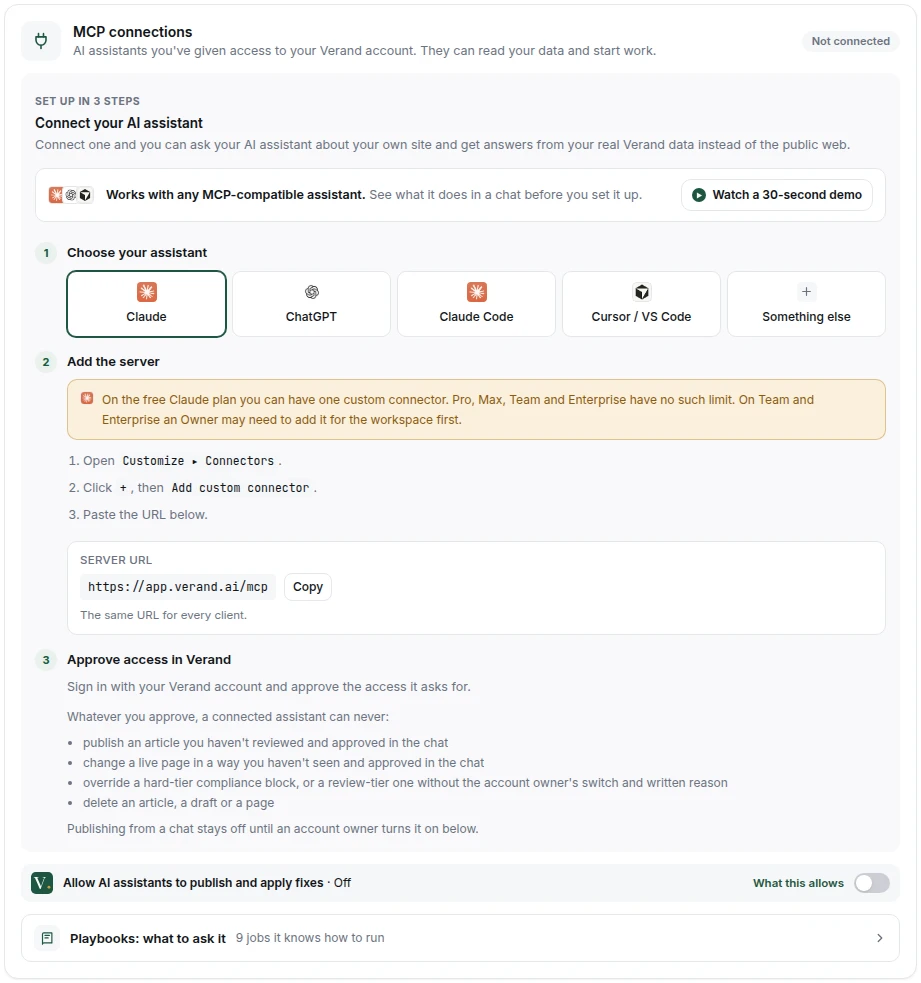
Connect Verand to your AI chat
NewAI connector
Connect Verand to the AI assistant you already use and ask about your sites in plain words: what to fix, where you rank, how AI assistants describe you.
Your real data: issues, opportunities, rankings, AI visibility, articles and usage.
Act with your yes: it can start research, draft fixes and save facts to your knowledge base, only after you approve each one.
Works where you work: setup steps for Claude, ChatGPT, Claude Code and Cursor or VS Code, with one address for all of them.
You stay in control: the approval screen opens with what the connector can never do, and Connected apps in Settings lets you disconnect any app.
Every plan now runs every routine Verand has, so Starter gets the same checks and scans as the larger plans. Plans now differ by volume, number of sites and AI assistants covered.
Now on Starter: the Search Console opportunity scan, the Opportunities scan with content decay, competitor monitoring, year rollover and the E-E-A-T audit.
Compliance gate on every plan: articles are checked against your industry's rules before they can publish, whatever plan you're on.
Already in the crawl: the internal linking sweep and E-E-A-T scoring run inside the full-site crawl on every plan.
A check that couldn't run no longer counts against you
When an AI assistant couldn't be checked, Verand now records a failed check instead of counting it as an answer that didn't name you, so an assistant's outage no longer drags your visibility down.
AI Visibility
Fixed
Local SEO reads your real business details
Local SEO now takes your business name, address and phone from what your site says about your business, so addresses mentioned in your articles no longer show up as your business contradicting itself.
Local SEO
Phone numbers: your number comes from your site's own contact details, not the first phone link on a page.
September 5, 2026
A clear next step when you reach a monthly limit
FixedArticles
Starting a Content Refresh or Full Rewrite after the month's allowance is used now tells you which limit you've reached, when it resets and how to move up a plan, the same way the Articles tab does, instead of a generic error or a Try again button.
September 3, 2026
A short guide to your first article
ImprovedHome
Home, Articles and Topic Research now explain how to get from a topic to a published article, so you know how to write the next one after setup.
First-article band: "Ready to write your first article?" opens a four-step walkthrough, from picking a topic to approving the draft.
Topic Research explained: the tab opens with a card that sets out the steps, the button for each and what each one gives you.
Steps aside: the band retires once your site has three articles, and the Topic Research card folds away after your second brief.
Find it: Home
September 2, 2026
Add Author Bio Pro from Settings
NewAuthor Bio Pro
Author Bio Pro, our WordPress plugin for author bios, can now be bought, extended and removed from Plan & Usage, on the same invoice as your Verand plan.
Buy in Settings: add it from its card in Plan & Usage.
Two sites at a time: each extra seat covers two more sites, and one licence key covers all of them.
Remove it yourself: removing it stops future charges, it keeps working until the end of the period you've paid for, and re-adding brings back the same key.
Automatic updates: the plugin updates itself from your WordPress Plugins screen, and a Licence tab in its settings holds your key.
Verand now emails you at the billing moments that matter, so an expiring card or a used-up allowance doesn't catch you by surprise.
Card expiring: a reminder before the card on file expires.
Allowance used: a note when you've used the month's articles or content refreshes, with the date it resets.
Annual renewal: a heads-up ahead of an annual renewal, with the amount.
Cancellation: a confirmation when you cancel, and another when your access ends.
September 1, 2026
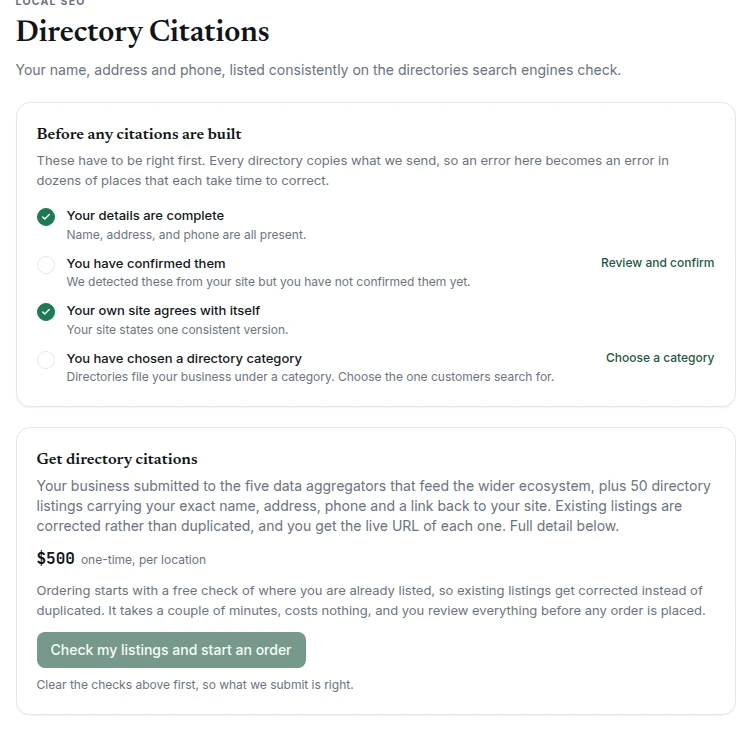
Pay for Directory Citations at checkout
ImprovedLocal SEO
Directory Citations orders now take payment at a secure checkout when you place them, and you get an email as your order moves along.
Pay at checkout: placing an order opens a one-time card payment, and a checkout you abandon sends the order back to review.
Email updates: you hear from Verand at each step, from order to report.
Automatic refunds: withdrawing an order before it's submitted refunds it in full, or cancels the payment if it hadn't gone through.
Find it: Local SEO, then Directory Citations
September 1, 2026
Country flags show on every computer
FixedDashboard
Country flags in Settings, Keyword Tracking, SEO Analytics and setup now display on every computer, including Windows, where they used to show as two letters.
August 2026
August 31, 2026
Follow a scan from any AI Visibility tab
ImprovedAI Visibility
A live scan card now shows on every AI Visibility tab, so you can follow a scan from Visibility, Mentions & Citations, Sentiment, Sources, Topics or Prompts, not just Overview.
Every tab: the card follows the scan wherever you are in AI Visibility.
While prompts are written: during setup the card says how many of your prompts are written so far and that the rest land in a few minutes, so a short list doesn't look final.
Find it: AI Visibility
August 29, 2026
Jump between Opportunities sections
ImprovedOpportunities
Opportunities now has a menu that stays at the top as you scroll, so you can see what's further down a long page and jump straight to it.
Section menu: lists only the sections that have something in them, with counts, and highlights the one you're reading.
Explainers: each section opens with a short band saying what it holds and how to work it.
Cleaner gaps: the Gaps list no longer suggests competitors' brand names, people or properties, or searches tied to past years.
Find it: Content, then Opportunities
August 29, 2026
Switch prompts on and off
ImprovedAI Visibility
Every prompt in your AI Visibility library now has an on/off switch, so you choose what's tracked without leaving the list.
Switch per prompt: flip a prompt on or off right in the table, and the confirmation shows how much of your allowance is left.
Paused with a reason: prompts held back by your trial or plan show as Paused and say why.
Limits up front: Generate prompts shows your ceiling before you reach it, and switching a prompt on tells you its first results arrive with your next scheduled scan.
Find it: AI Visibility, then Prompts
August 29, 2026
One disclaimer per article
FixedArticles
Articles now carry their required disclaimer once, in one consistent wording, instead of sometimes showing two slightly different versions on either side of the sources list.
August 27, 2026
Google's AI answers are checked from your city
ImprovedAI Visibility
For local businesses, Google AI Overviews and AI Mode are now checked from your own city, so you see the answer your customers see rather than a country-wide one.
Your city: checked from the city in your business details, or your country when the city can't be matched.
Every office counts: a prompt naming an office's city is checked from there, and the rest are shared across your offices at no extra allowance.
Local prompts: suggested prompts name the cities your buyers are in instead of your state, at setup and in Generate prompts.
Chat answers unchanged: ChatGPT, Claude, Gemini and Perplexity answer the same from anywhere, so they're checked as before.
Keyword and prompt allowances are shared across your sites
ImprovedPlans
Tracked keywords and AI visibility prompts now come from one allowance for your whole account, so your plan's numbers mean the same thing whether you run one site or several.
One pool: every site draws from the same allowance, and you decide which site uses it.
Told up front: adding a site explains the shared allowance before you start.
Second site ready: a new site arrives with a full set of prompts researched and switched off, ready for you to turn on.
Real totals: Plan & Usage and the AI Visibility allowance ring count across your whole account.
Find it: Settings, then Plan & Usage
August 27, 2026
Setup shows what it learned about you
ImprovedOnboarding
Step 5 of setup now shows what Verand learned from your site for you to confirm, instead of asking you to type it in at the end of the wizard.
Your voice, from your writing: the voice, persona, audiences and products on that screen come from your own pages.
Sources named: the step lists the pages Verand learned from, so you can see where your profile came from.
Less to fill in: the reference articles field is gone, and when no articles were found the list simply isn't shown.
August 27, 2026
Invited teammates land on your dashboard
FixedTeam
Teammates you invite now land straight in your account's dashboard with your sites already there, instead of a blank Home.
Branded invite: the invite email now looks like the rest of Verand's email, and signing in is all it takes to accept.
One account: a teammate who adds a site adds it to your account rather than creating one of their own.
August 26, 2026
Re-learn your brand profile from your site
NewBrand Hub
Your brand profile can now keep up with your site: Re-learn from your site reads your pages again and proposes an updated profile, and you choose what changes.
Card by card: proposals cover your voice and persona, about, products and audiences, each with a tick box and a Show current toggle.
Hand edits kept: only the cards you tick are saved, so text you've tuned yourself stays as it is.
Suggested for you: when a crawl finds new or changed pages, Brand & Voice shows a banner with the proposals ready to review.
Safe to close: a re-learn takes about a minute and keeps running if you close the window.
Your articles won't cite or link to your competitors, and articles you point Verand at now sharpen how it describes your voice, not how it lays out pages.
Competitors blocked as sources: every competitor you add, at setup or later, joins your Blocked Sources, and taking one off that list stays your call.
Use an article: under Brand Voice & Tone, paste one of your articles and Verand refines your voice description, keeping what you've written.
Use a page: under About your Brand, paste a page and Verand refines your brand description the same way.
Nothing saved until you say so: changes appear in the open editor, so Cancel or Undo puts things back.
Find it: Brand Hub, then Competitors
August 26, 2026
One live crawl status on every tab
ImprovedSite Health
While your site is being crawled, Home, Site Health, Issues and Page Tracker now show the same live progress card, so no tab says there's nothing to see while the crawl is still working.
One progress card: live progress and an elapsed clock on all four tabs, and the page refreshes itself when the crawl finishes.
Plain status: a crawl that's about to begin reads Starting up.
Score first: your score appears without waiting for page thumbnails, which now come last.
August 26, 2026
Search Console picks the right property
ImprovedSettings
Connecting Google now leaves you with working data: Verand picks the Search Console property that matches your site, and each page's numbers fill in straight away.
Right property: the property matching your site's domain is picked for you, and when there's more than one plausible choice Verand asks you once instead of leaving the connection empty.
Data right away: once Search Console or Google Analytics is connected, each page's clicks, impressions and visits fill in straight away and then refresh daily.
Back where you started: signing in to Google returns you to the tab you started on.
Find it: Settings, then Integrations
August 26, 2026
Number ranges and fact limits come through intact
FixedArticles
Number ranges such as 2020-2024 or 5-10% now come through new articles exactly as written, instead of being turned into a comma.
Fact limits honoured: when you fill in "Don't use when" on a knowledge base fact, articles now respect it, so the fact stays out where you said it doesn't belong.
August 25, 2026
New keywords are checked right away
ImprovedKeyword tracking
Keywords you add are now scanned within minutes instead of waiting for the next daily check, so your first rankings show up in the same session.
Scan on add: adding keywords starts a scan right away, and adding a few batches in a row still runs a single scan.
Live status: while it runs, the rankings card says your first scan is running instead of naming tomorrow's time.
Your country: keywords are checked in your site's country rather than defaulting to the US.
Connected, not empty: with Search Console connected and no keywords yet, the tab says you're connected and points you to Add keywords.
Find it: Keyword Tracking
August 25, 2026
Comments and infographics without a reload
FixedEditor
Comments and generated images in the editor now update on their own, so you don't need to reload the page or keep a window open.
Comments: a comment added from another tab shows up without refreshing.
Images and infographics: closing the window doesn't stop the image, reopening it picks up the progress, the toolbar's Infographic button shows Drawing… while it works, and the finished image drops in at your cursor.
August 24, 2026
Run an AI visibility scan when you want one
ImprovedAI Visibility
AI visibility scans now run on the same schedule as the rest of your routines, so you can start one yourself from Scheduled Tasks instead of waiting for the next one.
Run now: starts a scan straight away across every AI assistant your plan covers.
One schedule: scheduled scans run alongside your other routines, with each assistant checked on its own cadence.
Scans that finish: a scan that gets interrupted picks up where it stopped instead of starting over.
Find it: Scheduled Tasks
August 24, 2026
Site Health shows coverage and authority at a glance
ImprovedSite Health
Site Health now gathers what the audit checked, your audit history and your sources into one row, and it tells you plainly when your own site is returning errors.
Coverage row: what we checked, past audits and the sources card sit side by side at one height.
One authority gauge: your authority score and your competitors' use the same half-gauge everywhere in Site Health.
Sources card: shows the regulators your articles can cite and links to the articles ready for sources.
Server errors called out: when your pages return errors, a red notice says the fault is on your site and lists example pages, with a support link for anything else that looks wrong.
Find it: Site Intelligence, then Site Health
Content built to rank in Google and get cited by ChatGPTPerplexityGeminiClaude, with every claim checked before it goes live.