

 ChatGPT
 Gemini
 AI Overviews
 Perplexity
 Claude


 You
 Origin Investments
 Ashcroft Capital
Home is the page you land on: what needs you, how your content is moving, and what Verand has been doing. Scheduled Tasks and the Runs feed show that work in detail, routine by routine and run by run.
Every Home card builds itself from your own data. A card with nothing to show yet hides rather than showing zeros, so a new site has a shorter Home than an established one.
The top of Home
The briefing. Under the greeting, one or two sentences: whether site health went up, down or held since the last crawl, how many drafts are waiting for review, how many search queries are breaking out, and how many pages carry a compliance flag. It's assembled from fixed rules, not written by AI.
Get started with Verand. The setup checklist, with the next step named and a button that starts it. Click the card for the full list, which How Verand works describes. It retires once every item is done or skipped, when you dismiss it, when your subscription becomes active, or 30 days after the site was added.
Day-one cards. After onboarding you'll see cards for your first article and your first full crawl, plus Working for you right now, which lists every routine running for your site with live progress. Each row drops off when its run finishes, and the page refreshes so the new data shows. Hide any of them with the ✕.
The KPI tiles. Up to six: Compliance, Domain authority, AI visibility, Avg position · 28d, Clicks · 28d and Conversions · 28d. Except Domain authority, which reads "Awaiting analysis" until it's measured, a tile appears only once its source has data, so the Search Console and GA4 tiles need those connections.
Watch: What needs your attention
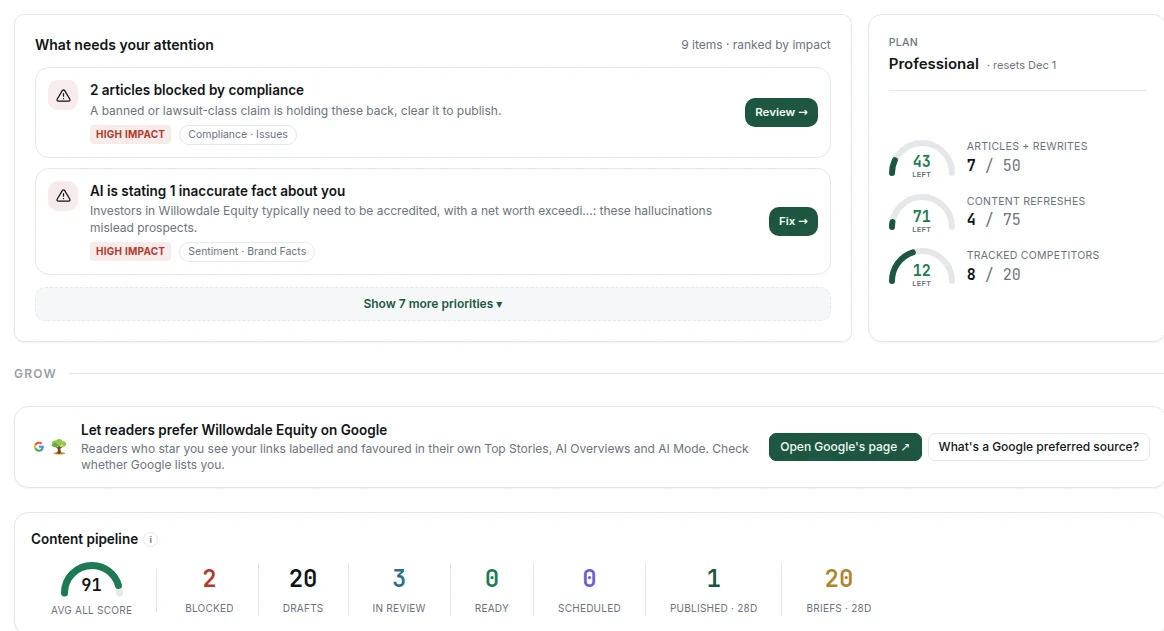
This feed ranks what's waiting on you. It shows the top two, and a link such as Show 3 more priorities reveals the rest. Each item says what's wrong, its impact and its source, with a button to go and deal with it.
Items include pages your host refused during the last crawl, articles blocked by compliance, AI assistants stating inaccurate facts about you, a disconnected Search Console or Analytics, drafts awaiting approval, products drafted from your site, broken links, pages losing traffic, your top opportunity, new pages Google hasn't indexed after 7 days, and nearing your monthly article limit.
Beside it, a compact Plan card shows Articles + Rewrites, Content Refreshes and Tracked Competitors. When nothing needs you, the Watch section gives way to the fuller Usage this month card.
Grow
Content pipeline. Your articles by state: Blocked, Drafts, In review, Ready, Scheduled, then Published and Briefs over the last 28 days, beside your Avg ALL score. Articles published before Verand recorded publish dates, or by merging a pull request in your repository, have no date we can see, so they're counted as undated rather than as nothing. Once three new pages have been watched through to indexed, Avg to index appears too.
Search and traffic. Visibility trend (your keyword-weighted share of search clicks, from Keyword Tracking), Visitors, Top queries, Top Pages, and How traffic converts, which follows organic search and AI-assistant traffic from visits to conversions. Each needs its source connected.
Top opportunities. Up to five next moves, one of each kind where it exists: a cannibalization fix, a striking-distance keyword, a page with traffic but low engagement, a competitor gap, a topic idea, and a question AI assistants are searching for. All opens Opportunities.
AI Search Visibility. Share of Voice, Visibility trend and Sentiment trend across the assistants, once your first scan has run.
Home may also ask whether Google lists your site as a preferred source. Confirm it does and the card leaves Home; Site Health, Issues and Page Tracker explains it.
Health and activity
Site health. Your overall score and its change since the last crawl, Core Web Vitals where measured, a 30-day trend, and open issues split into Worth fixing, Consider and Safe to skip. While a crawl runs, it shows live progress instead.
Recent activity. Your site's last six runs: routine, headline result and how long ago. Failed runs have a red icon. Runs opens the full feed.
The Runs feed
Runs isn't in the sidebar: you reach it from Recent activity. It lists your site's last 50 runs with a status (Queued, Running, Completed, Warnings, Failed or Cancelled), the routine, its result and when it started. Click a run to open it. One that's still going streams live, step by step.
Scheduled Tasks
Scheduled Tasks lists every routine Verand runs on your site, grouped by rhythm: Every day, Every week, Every 2 weeks, Every month, Every year. How Verand works explains why it's read-only and what Run now allows each month.
Each row shows its last result, not just a date: a tick or a warning, "Ran 3d ago" and the run's headline, with View to open it. A routine mid-run shows Running, its latest progress line and a percentage, with Watch. On the right are its cadence and when it runs next.
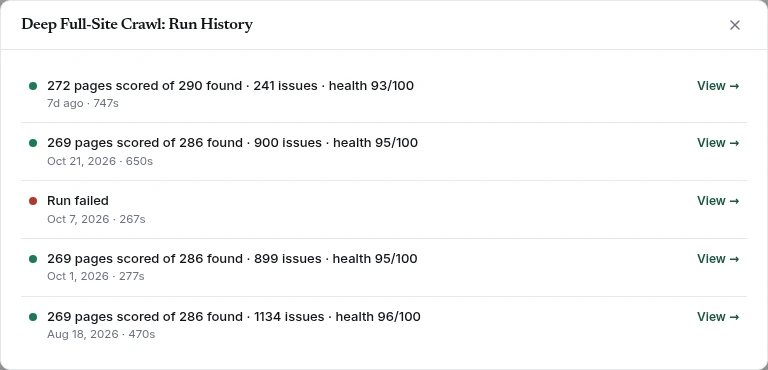
The ⋯ menu has two options. Run now starts the routine and follows it live in a window. For most routines a button at the end takes you to where the results land, such as View in Site Health. If a run can't start (allowance used, or run too recently) the reason appears under the row. View run history opens Run History: the last 20 runs, each with its headline, when it ran and how long it took. Click View for the full detail.
Always on. At the bottom, Google Search Console sync and Google Analytics sync show a state rather than a schedule: Connected: syncing every day, Not connected with Connect, or Reconnect if Google revoked access.
If scheduled work is paused, a banner at the top says why, and the "next" times show when each routine resumes. Nothing is un-enrolled. If your subscription is inactive, Run now is paused too.