


 ChatGPT
 Gemini
 AI Overviews
 Perplexity
 Claude


 You
 Origin Investments
 Ashcroft Capital
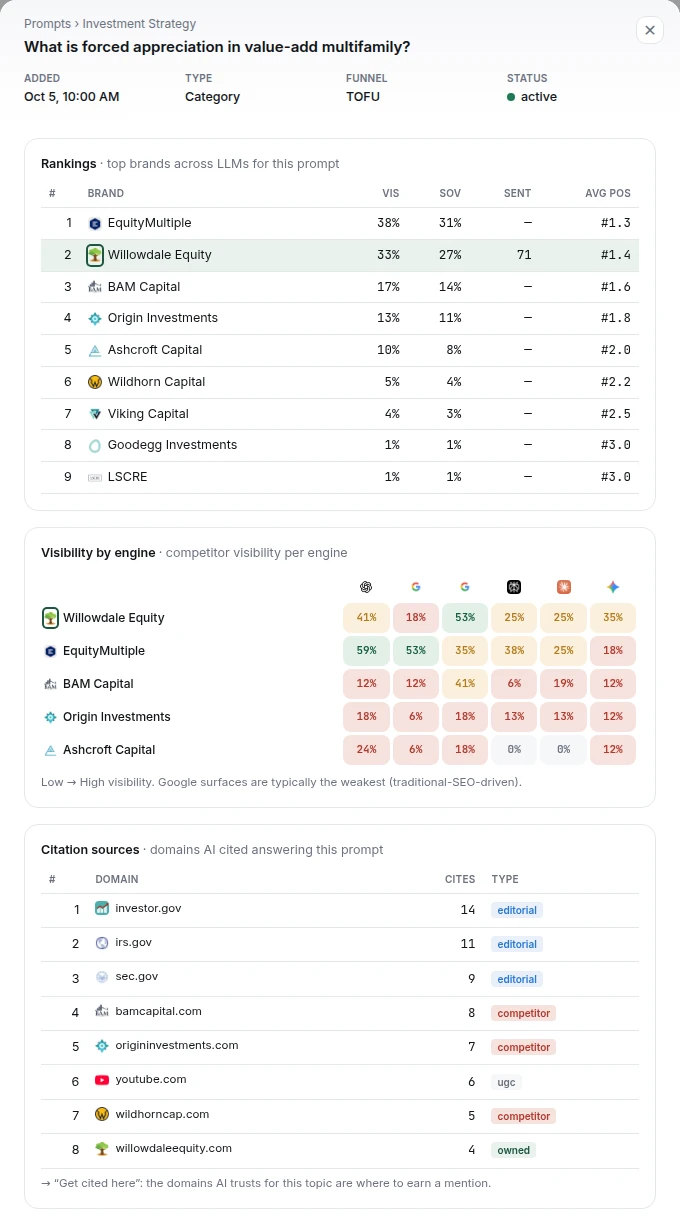
People ask AI assistants the questions they used to type into a search box. This tab tells you what those assistants say when the question is about what you do.
It's a different measurement from rankings. A page can rank third and never be quoted, or rank nowhere and be the source an assistant cites.
AI Visibility has seven tabs, all built from the same answers:
| Tab | What it answers |
|---|---|
| Overview | Where you stand at a glance: how often you're named, who's named instead, and what to fix first |
| Visibility | How often you're named for your prompts, against the competitors you track, over time |
| Mentions & Citations | Every answer behind the numbers. A mention names you; a citation links to your site |
| Sentiment | How you're described: the tone, the strengths and weaknesses repeated, and facts they get wrong |
| Sources | The pages the assistants cite, and where to get mentioned |
| Topics | Your prompts grouped by topic, each scored only on its own prompts' answers |
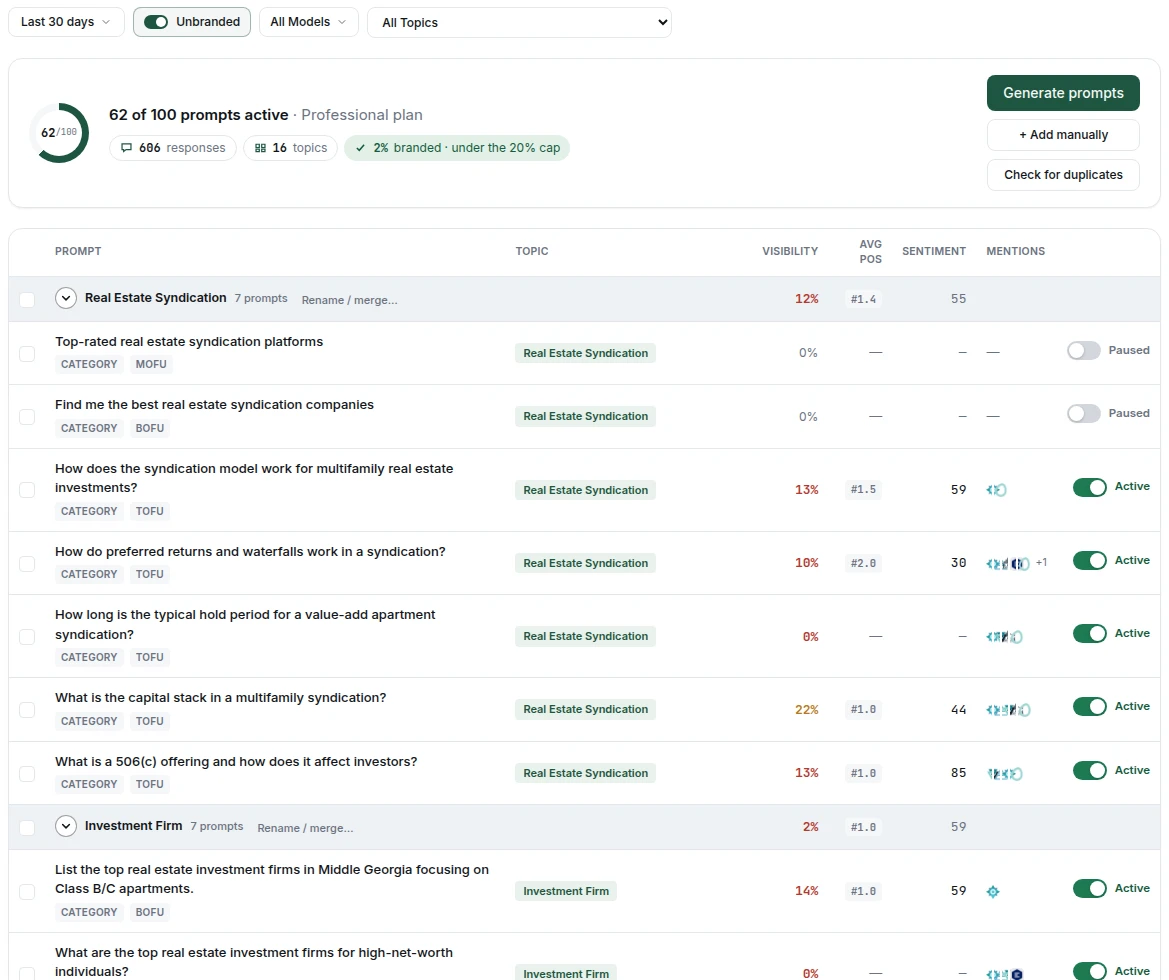
| Prompts | The questions Verand asks for you. Add, pause or regroup them here |
Prompts
A prompt is a question a real prospect would ask, in their words. "Who are the best estate planning attorneys in Austin." "Is a 1031 exchange worth it for a small investor." Not keywords: questions.
Verand generates a starter set from your site during onboarding, and you should edit them. You know how your clients phrase things, and the answer is only ever as useful as the question.
Prompts are pooled across your account, not per site. On Growth, 50 prompts is 50 between your sites, and you decide the split.
Topics group your prompts. Each site has one topic list, and a prompt that fits none of them goes under Other. On the Prompts tab, Move to topic regroups the prompts you've selected, and Rename / merge… on a topic renames it or folds it into another.
Verand tells you when a new prompt repeats one you have. Whether you generate prompts, type them, import a spreadsheet or track a fan-out query, each new prompt is checked against the ones you already track, and against the rest of the batch. If it asks the same question for the same buyer in other words, you'll see which prompt it repeats and why, and you choose: Keep both, Replace existing (the old one is paused, not deleted, so its history stays) or Skip this one. Flagged prompts are set to Skip, and you can still keep them. A different city, buyer, budget or named competitor counts as a different question. It's a suggestion, never a block: if the check can't run, your prompts are added as usual.
To tidy up a set you already have, press Check for duplicates on the Prompts tab. It takes up to a minute, then lists pairs of active prompts that ask the same thing. For each pair, pick Keep both (it won't be flagged again, for anyone on your team), Pause first or Pause second. Pausing frees a slot in your allowance and keeps the prompt's history. Checking again while your prompts haven't changed shows the last result straight away; a changed set can be checked up to five times a day.
| Plan | AI-visibility prompts | Assistants checked |
|---|---|---|
| Starter | 25 | 3 |
| Growth | 50 | 5 |
| Professional | 100 | 6 |
| Agency | 200 | 6 |
The assistants, and how often each is checked
| Assistant | Checked | Included from |
|---|---|---|
| ChatGPT | Daily | Starter |
| Google AI Overviews | Daily | Starter |
| Gemini | Daily | Starter |
| Google AI Mode | Daily | Growth |
| Perplexity | Weekly | Growth |
| Claude | Weekly | Professional |
The cadence is per assistant, and it isn't a setting. The daily ones are cheap to check and their answers move often. The weekly ones cost several times more per check and move more slowly, so checking them daily would buy noise rather than signal.
What gets recorded
For every prompt against every assistant:
- Whether you were mentioned at all
- Whether you were cited with a link, and which of your pages it linked
- Who else was named in the same answer
- The tone of the mention
Reading it
Three patterns are worth acting on.
Mentioned but not cited. The assistant knows who you are and didn't link you. That's usually a structure problem rather than a content one: the answer exists on your page but not in a form that's easy to lift. An answer block near the top of the page is the common fix, and it's one of the guarded fixes in the editor.
A competitor cited where you aren't. The most actionable row in the product. Their page is answering something yours doesn't. This usually becomes a refresh of an existing page rather than a new article.
Never appearing at all for a question central to your business. That's a coverage gap, not a ranking problem: there's probably no page that answers it directly. Take it to Topic Research.
Brands AI names alongside you (on the Visibility tab) lists businesses the assistants name in the same answers as you that you don't track yet. Each count is how many of your AI answers from the last 30 days name that brand, whatever date range the page is set to, and it's refreshed once a day. A brand is counted the same way your tracked competitors are: its name as a whole word or phrase, a one-word name only where it's written like a name ("Profound", not "a profound impact"), or its website written out. + Track adds it to your competitors, and it shows in your rankings and share of voice right away.
Opportunities turns this data into worklist cards, so you don't have to dig for it. AI fan-out lists the searches the assistants ran while answering your prompts. Negative attributes lists what they say against you, with the fix. Preferred source on Google appears when Google's AI answers have cited you. Mentions & backlinks summarises the pages they cite that aren't yours. See Opportunities.
Sentiment: Brand Facts and Attributes
Both cards cover the last 30 days, rebuilt by each scan.
Brand Facts lists the specific claims the assistants make about you: a minimum investment, a founding year, a service you offer. Claims not repeated in 30 days sit under Earlier. Mark each Accurate or Inaccurate.
Marking one Inaccurate opens Correct this fact. Type what's actually correct and press Save & draft fix, or Just mark inaccurate and add the correct value later. Verand saves your correction to your knowledge base, so articles can draw on it, and adds Why AI says this and What to do. Each scan then checks the answers: the fact shows Still present while the wrong claim is repeated, and Fixed ✓ once an assistant states your correct value.
Where a claim came from. Each fact names the assistants that said it and the pages they were reading; click it for every answer and page. For an Inaccurate fact, a page on your site offers Fix it on your page. A page on someone else's site offers Ask them to correct it, which drafts a correction request built only from what you entered, checked against your compliance packs. Edit it, Copy draft and send it from your own email: Verand never sends anything.
The facts you mark Accurate and the corrections you enter also fill in your AI instructions page draft (see Site Health, Issues and Page Tracker), and your Accurate facts feed the pitches drafted on the Sources tab.
Attributes shows what the assistants associate with you, each tile sized by how many answers say it, green for a strength and red for a weakness. It's split in two: Unbranded prompts (questions that don't name you, so read this side for visibility) and Branded prompts (questions that do, so read it for reputation). Hover a tile for why the assistants frame you that way; click it for every answer and page behind it.
A negative attribute comes with a Recommended fix: numbered steps, each with where to act and a button, such as Fix it on your page, Create a brief for a page you don't have, or Open Brand Facts. It's checked against your compliance packs. If it isn't written yet, press Write it now; Regenerate rewrites it. A weakness can be true, so the fix is context, not denial.
The same tab also has Brand Perception (your sentiment score with your top strengths and weaknesses), Brand Shape (the top attributes AI gives you and your tracked competitors, and how often each one is attached to each of you) and Head-to-Head (you against one tracked competitor you choose: visibility, average position and sentiment side by side, visibility and position counted over every answer in the date range you pick, with the leader of each marked, and what each of you is known for). Sentiment there is measured the same way for both of you: every answer that names a brand is read as positive, neutral or negative for that brand and counted, and a brand named in fewer than five answers shows no score rather than a shaky one. Brand Shape and that Head-to-Head sentiment are rebuilt once a week from a sample spread across the last 30 days of answers, and each answer is read in full; the card's footer says how many answers it read and how many it sampled from. Brand Shape's attributes come from both sides: your strongest ones first, then each competitor's own strongest, with near-duplicates merged and plain facts such as a dollar figure or a place left out, since a fact isn't a quality another brand can share. A competitor named in fewer than five of the sampled answers isn't drawn, and a wire resting on a single answer is drawn faint and dashed. A line under the card's title sums it up: the attribute AI ties you to most, and the one where a competitor leads you by 10 points or more (a share resting on a single answer is never quoted there). A lead also needs you and that competitor each named in at least five of the answers read; with fewer, it's too few to call, however wide the gap. Each attribute's label shows your share of it, and a competitor that leads you on an attribute by 10 points or more sits beside that attribute instead of on the edge. Click a brand under the chart to focus it: everyone else fades and its share and answer count show above each attribute it's tied to; click it again to clear. The eye on each brand hides it. Hover an attribute to see how many answers each wire rests on.
Sources: where to get mentioned
The Sources tab shows every domain and page the assistants cite for your prompts, and your share of those citations.
Found, Not Cited sits above it on plans that include Claude. Claude searches the web before it answers, and Verand keeps the list of pages that search returned. The card counts the Claude answers that found one of your pages and still cited other sites, and names the page passed over most. Open it for each page: how often it was passed over and who was cited instead. Open a page for the next step. A Comparison page lost on content, so open it for a refresh. A Reputation page was found for questions that name you, which review sites usually answer: more reviews on those sites is the fix, not the page. The card follows the date range and filters at the top of the tab. When Claude's search didn't find any of your pages in that range, it says so in one line.
Open one of those Claude answers in Mentions & Citations and the drawer says which of your pages its search found and how many other sites it cited instead. See every page Claude passed over brings you back to this card with that page open. Found means Claude's search returned the page; it doesn't tell you why Claude chose other sites.
Where to get mentioned lists the cited pages that aren't yours, ranked by how much a mention there would do for you, with who each page is working for today. A mention on a page the assistants already read is how your competitors get named.
Opportunity matrix opens the full list as a table or a board. Each page carries a tier (Best bet, Worth a pitch, Long shot or Can't be earned, for competitor and government pages), why it matters and what to do. Open a page to work it:
- Status: To do, Pitched, Landed or Won't pursue. A weekly check reads each page and marks a pitched one Landed when it starts naming you; you can set it yourself sooner.
- Draft a pitch: writes an outreach email from the page, what the answers reward, and your knowledge base, checked against your compliance packs. Edit it, then Copy draft or Regenerate. Mark as pitched once you've sent it. Verand never sends outreach: you send it from your own email.
- Mark [domain] as a competitor: if the site is really a competitor, one click files every page on it as a competitor page.
Correction requests drafted from Brand Facts are saved against the same pages.
Want this done for you? under the list is a service that's coming soon: press I want this to register interest. Nothing is charged.
Why the numbers move so much
They move a lot, and that's the technology rather than a fault in the measurement. Assistants are non-deterministic: the same question can produce a different answer an hour later, and the models change without notice.
Read the trend over weeks, not the difference between yesterday and today. A single missed citation is noise. A page that stops being cited across several assistants over a fortnight is a signal.
During your trial
Every plan runs 25 active prompts during the trial, rather than the plan's full number. Prompt cost scales with how many you run as well as how long you run them, so this is the one allowance that isn't simply "seven days of the monthly rate".
Nothing is lost by it. Your plan's remaining prompts are researched and written during onboarding, held, and switched on automatically when the trial converts. Engine coverage isn't reduced: if your plan checks six assistants, your trial checks six.