


 ChatGPT
 Gemini
 AI Overviews
 Perplexity
 Claude


 You
 Origin Investments
 Ashcroft Capital
Your competitor list tells Verand who to measure you against: on authority and search traffic, on the Google searches you track, and in the answers AI assistants give. This page covers building the list, what tracking turns on, and the few ways competitors touch your articles.
Your list
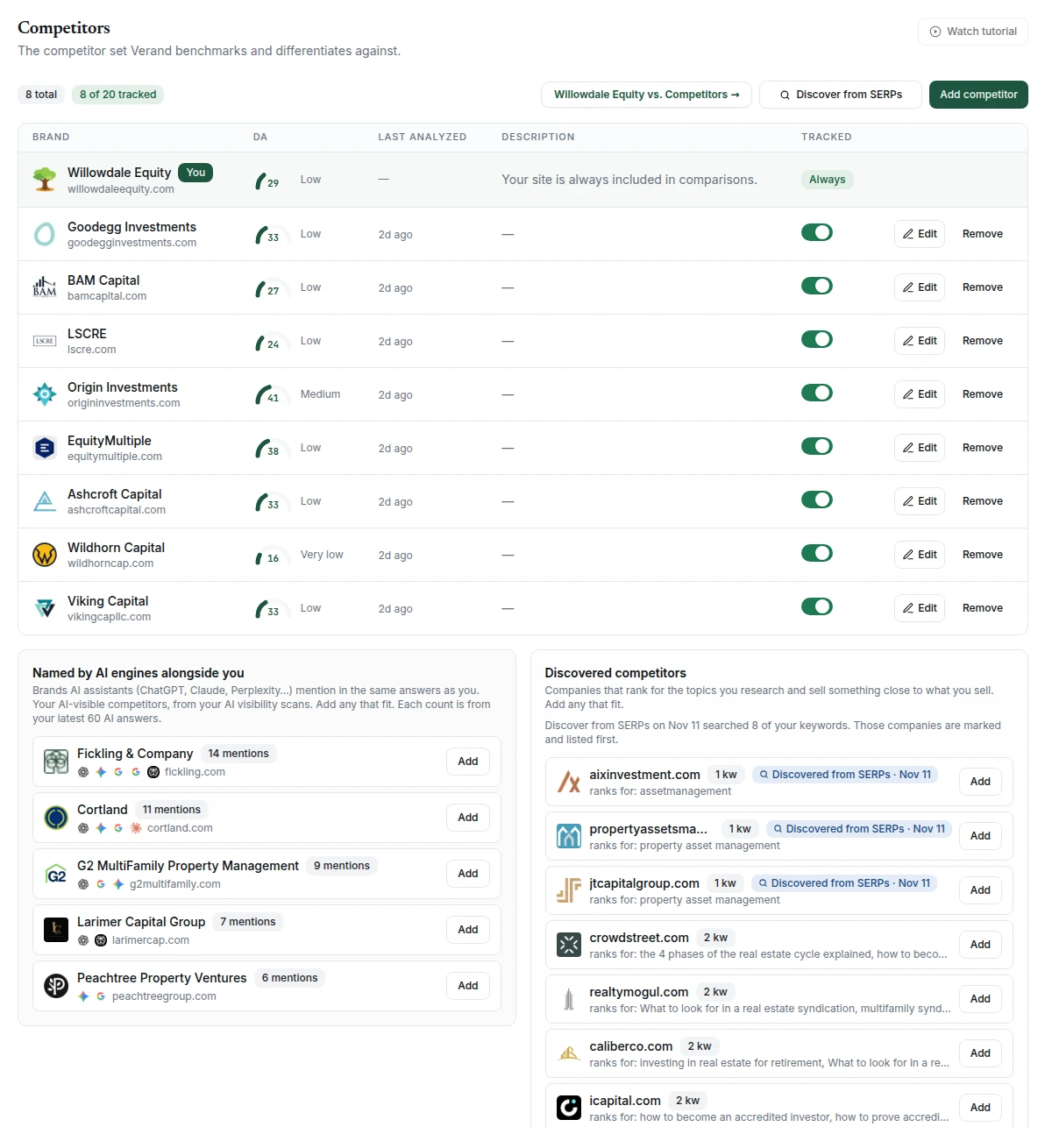
The list lives in Brand Hub → Competitors. Your own site is pinned at the top and is always included in comparisons. Each competitor row shows its domain authority, when it was Last analyzed, your description of it, and a Tracked switch.
Add competitor opens a short form: domain, name and a description. Type the domain first and the name fills itself in; change it if it's wrong. Edit and Remove sit on each row.
A competitor needs a domain to be measured. If you save a tracked competitor with only a name, Verand tries to find its site from search results. If it can't, the row says No domain, so not monitored. Edit to add one.
Finding more competitors
Two lists under the table suggest competitors you haven't added yet:
- Named by AI engines alongside you: brands the AI assistants named in the same answers as you, from your AI Visibility scans. Each count is how many of your AI answers from the last 30 days name the brand, refreshed once a day, with which assistants named it. Hover a brand for the breakdown by assistant, how many of those answers didn't name you, and a line from one of them. It's empty until your first scan has run.
- Discovered competitors: companies that keep ranking for the keywords you've researched in Topic Research, with how many of those keywords each one ranks for. A company's subdomains count as the company, and topics you've dismissed don't count. Big publishers, social sites, free blog hosts, government and education sites, and brands already on the AI list are left out. Verand also checks each one against what you sell, from your Brand Hub, and leaves out businesses in a different line of work and sites that only publish or list others. An online broker or quote site that sells the same product as you counts as a competitor. If it can't tell, the site stays on the list for you to judge. Hover a company to see the keywords it outranks you on and its domain authority next to yours.
Discover from SERPs runs a fresh search for your topics and adds what it finds to the second list. It searches the queries your pages appear for in Search Console, or the keywords you've researched if Search Console isn't connected. The latest scan is saved, so its finds stay after you reload or come back. They're listed first, with a blue Discovered from SERPs chip and the date of the scan, and each new scan replaces the last one. While it searches, a notice under the buttons says where the results will land; when it's done, it says how many it found, and Show me scrolls you to them.
Click Add on any suggestion that fits.
The tracked limit
Tracking is what costs money to measure, so each site has a limit on tracked competitors. The list itself is unlimited.
| Starter | Growth | Professional | Agency | |
|---|---|---|---|---|
| Tracked competitors per site | 5 | 10 | 20 | 40 |
The badge at the top reads N of M tracked. At the limit, a suggestion you add joins the list untracked, and switching another one on asks you to stop tracking one first. If you move to a smaller plan while tracking more than its limit, you can still untrack, edit or remove competitors. You just can't track more.
What tracking turns on
The Competitor Authority Monitor. Once a month, Verand measures you and each tracked competitor: domain authority, linking sites, links gained and lost, and estimated search traffic and keywords. The first comparison runs on its own after your first crawl. A competitor you add later is measured on the next monthly run, or when you click Re-analyze on Site Health.
Keyword Tracking. Each daily scan records where your tracked competitors rank on the same searches as you. That feeds the Best rival column and the Competitors card, your share of voice against theirs. A competitor you start tracking shows up from the next scan; earlier days aren't filled in.
Opportunities → Gaps. The topics in Gaps come from the searches your tracked competitors rank for and you don't.
AI Visibility is the exception: it compares you with every competitor on your list, tracked or not. The vs competitors view on the visibility chart and Head-to-Head on the Sentiment tab count how often the assistants name each one. Comparisons start from the next scan after you add a competitor.
Authority vs. competitors on Site Health
This table puts you beside your tracked competitors: Authority, Organic (estimated monthly traffic, with the number of keywords below it), Ref. domains, Velocity 30d, a 6-mo trend of linking sites, and Spam. Hover a column heading for what it means. Manage competitors → takes you back to Brand Hub. Stop tracking or remove a competitor and it leaves the table straight away; its numbers are kept, so tracking it again brings its history back without waiting for the next run.
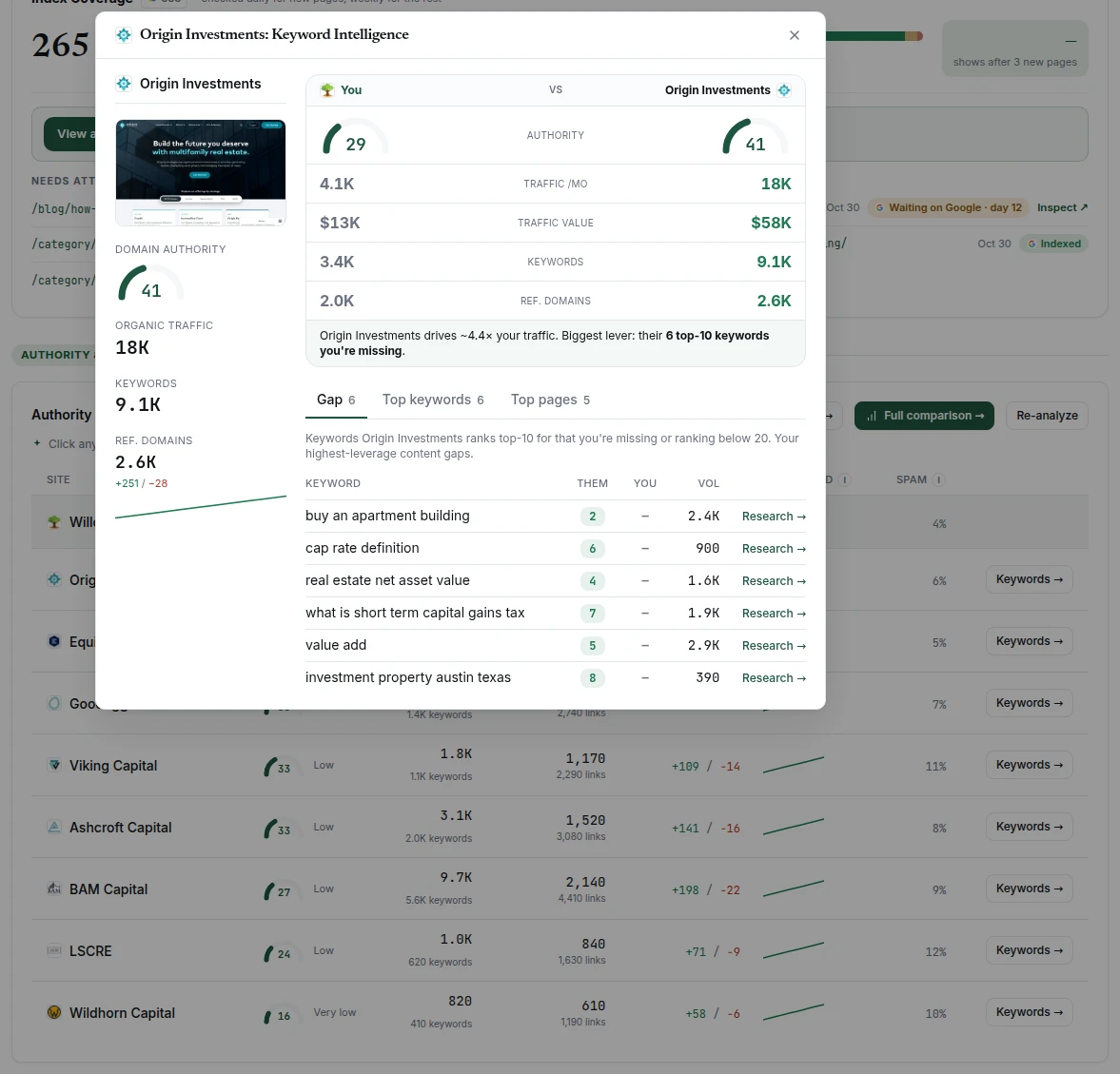
Click a competitor, or Keywords →, to open its Keyword Intelligence. It sets you and them side by side, then has three tabs:
- Gap: searches they rank in the top 10 for where you rank below 20 or not at all. Searches for their own brand are left out. Research → opens the keyword in Topic Research.
- Top keywords: the searches sending them the most traffic.
- Top pages: their pages earning the most traffic.
Full comparison → shows every tracked competitor in one grid, with a chart of keywords against traffic and the Top content gaps that the most competitors share.
Each site is measured in its own market. Traffic, keywords and gaps come from the country you confirmed for your site during onboarding, so a Canadian site is compared on Canadian search results, not US ones. Authority and linking sites aren't tied to a country.
What competitors change in your articles
Verand doesn't use your list to steer what an ordinary article says. Three things do follow from it:
- Their sites aren't cited. Adding a competitor, in Brand Hub or with + Track in AI Visibility, adds its domain to Blocked Sources (Sources & Disclaimers). Articles are written without citing it, and a draft that links to it anyway gets a warning. Removing the competitor leaves it blocked; take it off Blocked Sources yourself if you ever want it cited.
- List articles may include them. When research picks the options for a List article, your competitors are among the candidates, and the ones that fit the search can make the list, spelled the way you spelled them. You see and can change every option in the brief before anything is written.
- Their brand searches stay out of your ideas. A search for a competitor's own brand is a lookup, not a topic, so it's left out of Gaps and AI fan-out.