


 ChatGPT
 Gemini
 AI Overviews
 Perplexity
 Claude


 You
 Origin Investments
 Ashcroft Capital
Two separate tabs, because they answer different questions and cost very different amounts to run.
- SEO Analytics: free and always on. What Google already knows about you.
- Keyword Tracking: metered and capped. Exact daily positions we go and measure.
SEO Analytics
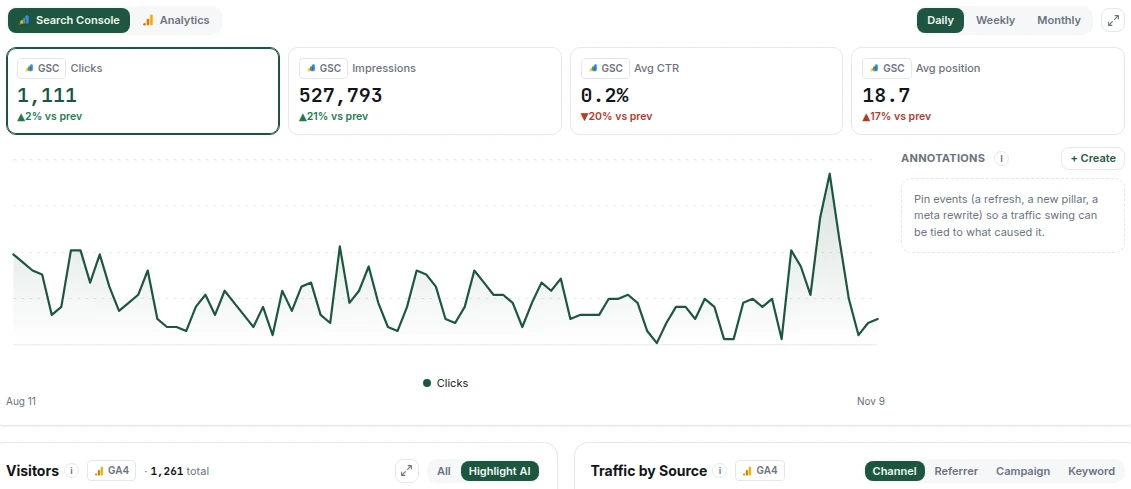
Once you connect Google Search Console and GA4, this tab shows the whole funnel joined per landing page:
query → impression → click → session → engagement → conversion
Search Console covers the first half: what people searched, how often you appeared, where you ranked, whether they clicked. GA4 covers the second: what happened after they arrived.
Only your site's own traffic counts. If your GA4 property also collects other hostnames, Verand leaves them out of traffic numbers: hosts on another domain (a staging or preview copy of your site) always, and a subdomain (your app, a help centre) when you choose to. If your GA4 property tracks a subdomain you haven't decided on, Settings → Integrations → Google Analytics asks once: Leave it out or Keep counting it. The Hostnames row on that card shows what's left out, and Edit changes it. Conversions still count from every host, so a sign-up that happens in your app is never lost. The tab says which hosts it left out.
Joining them per page is the useful part. Search Console alone tells you a page gets clicks; GA4 alone tells you a page has sessions. Together they tell you a page gets clicks and those people leave immediately, which is a completely different problem from not getting clicks at all.
Both connections are free and there's no metering on this tab. Connect them during onboarding or from Settings → Integrations.
Keyword Tracking
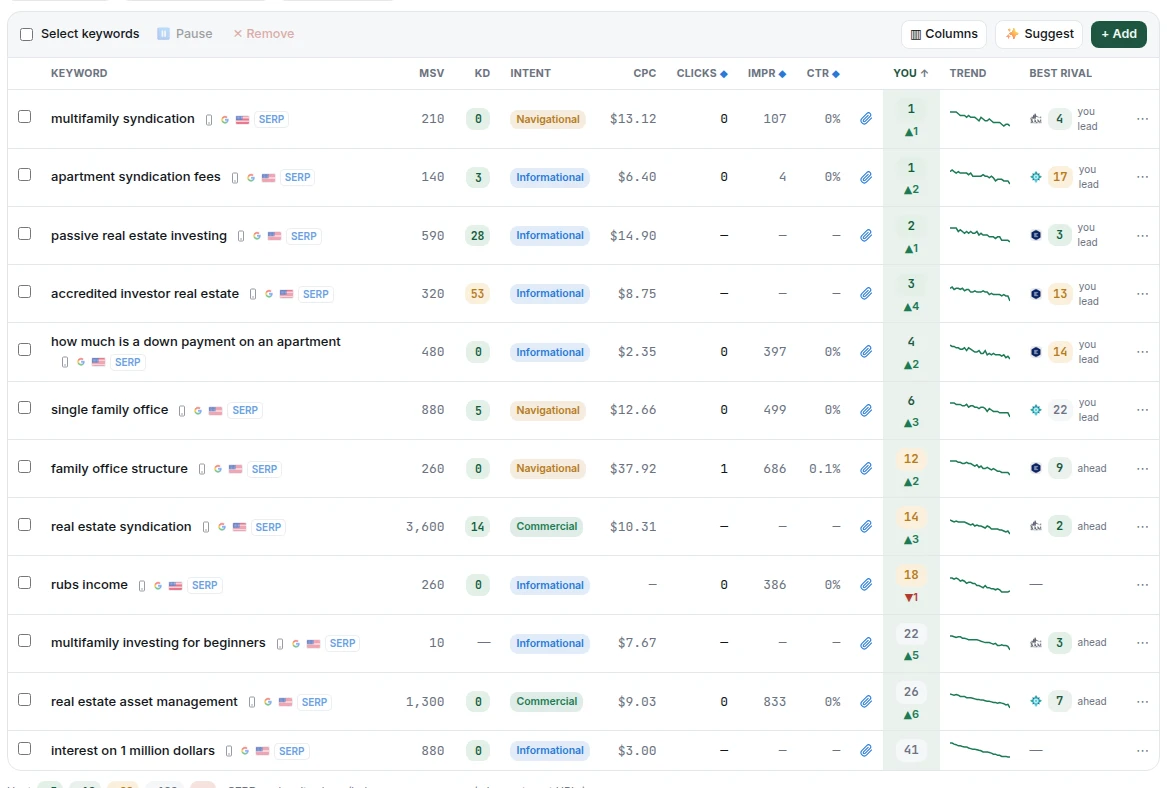
Search Console reports an averaged position across every impression, so it can't tell you where you actually rank for a phrase today. Keyword Tracking runs real searches and records the real result.
What it gives you
- Exact daily positions for every keyword you track
- Competitor positions on the same searches, at no extra cost, because your competitors' rankings ride along in the same result we're already fetching
- History, so you can see movement rather than a snapshot: the charts reach back up to a year, and a single keyword's history goes back to the day you started tracking it
How the daily scan works
Every keyword is checked daily. The depth varies: Mondays go 100 results deep, so if you're at position 34 we can tell you that. Every other day checks the top 20, which is where rankings actually move day to day.
The cap counts SERP checks, not phrases
This is the single most misread thing on this tab.
| Plan | Tracked keywords |
|---|---|
| Starter | 100 |
| Growth | 300 |
| Professional | 750 |
| Agency | 2,000 |
A slot is one keyword, in one location, on one device. Tracking "estate planning attorney" on both mobile and desktop uses two slots. Tracking it in two cities uses two. That's not a technicality: each one is a genuinely separate daily lookup with its own cost.
Location defaults to the US and device defaults to mobile, so unless you deliberately add variants, one phrase is one slot.
The cap is pooled across your whole account, not per site. On Growth, 300 keywords is 300 spread across your two sites however you choose, rather than 300 each. It means the same thing whether you run one site or twenty.
Pausing versus deleting
Pause a keyword and the daily scan stops but the history stays. That frees the slot without losing what you've collected. Deleting removes the history too, so pause unless you're sure.
Where keywords come from
You can add them manually, import them from your Search Console queries, or accept suggestions. Search Console import is usually the fastest start: it's the phrases you already appear for.
Rankings and Top Pages
Keyword Tracking has two sub-tabs. Rankings is the keyword-by-keyword view. Top Pages groups the same keywords by the page that ranks for them, scores each page's visibility, and charts which pages are gaining or losing ground. Click a page to see its last 28 days from Search Console and an Also ranks for list of queries you aren't tracking yet, each with a + Track button.

Which do I look at?
SEO Analytics for "how is the site doing and where is traffic going." It covers everything Google has data on, free.
Keyword Tracking for "am I winning the specific phrases I care about." Precise, competitive, and capped, so spend the slots on the terms that matter commercially rather than everything you might rank for.