


 ChatGPT
 Gemini
 AI Overviews
 Perplexity
 Claude


 You
 Origin Investments
 Ashcroft Capital
A new page earns nothing until Google indexes it. Verand helps in the two ways that usually matter, links from your own stronger pages and a daily check on what Google says. This page covers what happens after a page goes live, and what Verand can and can't do about indexing.
What counts as a new page
Opportunities → New pages shows every new page on your site for 30 days:
- Pages you publish through Verand. A Content Refresh or Full Rewrite republishes a page that already existed, so it doesn't count as new.
- Pages you publish anywhere else. Verand reads your sitemap daily and adds any page that wasn't there before, dated from the page's own published date. A page without one shows Found on your site with the day Verand found it.
Never treated as new: noindex pages, redirects, pages whose canonical points elsewhere, pages that aren't really content (your home page, category and tag listings, thin pages) and undated product pages. Finding pages published elsewhere needs a sitemap. The first read records what's already there as existing, so day one doesn't bring hundreds of "new" pages; pages from the last 30 days that carry their own date still show.
The card
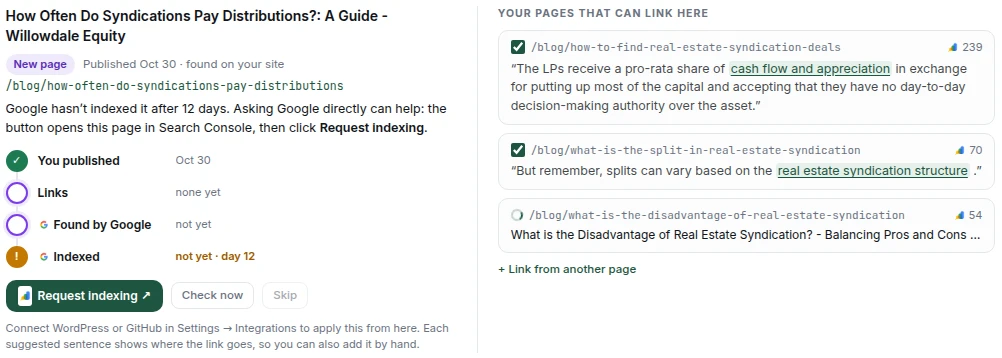
Each new page gets a card with a four-step track: You published (or Found on your site), Links, Found by Google and Indexed. The line above the track says where the page stands in plain words. Pages Google still hasn't indexed after 7 days come first, then pages with no links yet. The section shows three cards at a time, and Show 3 more brings the rest.
The two Google steps need Search Console connected. Without it you still get the link suggestions.
Linking it from your older pages
A link from a page Google visits often is how a new page gets found. For a page with no links yet, the card lists up to three related pages of yours with the most Search Console impressions.
- Preview finds a phrase in a sentence that's already on each of those pages and shows the link in that sentence. Nothing new is written, so there's no new claim to check.
- Untick any link you don't want.
- Add puts the rest on your live site, on WordPress or a GitHub site. Nothing is added until you click.
Not connected? Each sentence shows where the link goes, so you can add it by hand.
Link from another page lets you search your pages and pick one yourself; Verand finds a sentence on it the same way and shows you the link first. Once a page has links, Suggest more links offers more.
Your AI assistant can do the same through the MCP connector, with your approval for each link.
Watching Google
With Search Console connected, Verand asks Google about each new page every day until it's indexed, using Search Console's URL Inspection. That only reads Google's answer: it never asks Google to crawl, so checking has no effect on ranking.
Check now asks again on the spot. If the page was checked in the last 10 minutes, you get that answer instead of a new one.
Request indexing appears once a page has links, or once it's been waiting 7 days. It opens the page in Search Console; click Request indexing there. Google only lets you do that yourself, so Verand never does it for you.
Verand can't make Google index a page. It reports what Google says and helps with what usually moves it. Google decides when, and sometimes whether.
What Google's answers mean:
| Google says | What it means |
|---|---|
| Indexed | It can appear in search results |
| Discovered, not indexed | Google knows the address but hasn't visited. Links and a request usually move it |
| Crawled, not indexed | Google visited and passed for now, often because the page looks thin or too close to another of yours. Strengthen it and link to it |
| Unknown to Google | Google hasn't come across it. Check your sitemap and link to it |
| Left out | Excluded on purpose: noindex, a redirect, or another page chosen as the main version. Often intended |
| Couldn't check | No answer this time. Verand tries again on the next check |
On Site Health and in Page Tracker, hover an answer for the same explanation and Google's own wording.
When it's indexed, or you skip it
An indexed page leaves its card for the Indexed list at the bottom of the section, with how many days Google took.
Skip moves a page under Skipped, with Restore. It only hides the card: Verand keeps checking the page with Google. The number beside the section counts pages still waiting, skipped ones excluded.
Your time to index
The tile beside the section's explanation shows your average time to index over your last six new pages, with an arrow once there are enough earlier pages to compare against. Until three pages have been timed, it shows three slots that fill as Google indexes each one.
Only pages Verand watched from their first two days are timed. Checks run daily, so a time can read up to a day longer than Google took.
On Home, your average over your last six timed pages appears as Avg to index at the end of the Content pipeline card, once three pages are timed. When new pages are still unindexed after 7 days, What needs your attention shows how many, with a link to Site Health.
Indexing everywhere else
Site Health → Index Coverage covers your whole site: how many pages Google has indexed, a breakdown by answer, your average time to index, and the pages that need attention. New pages are checked daily, the rest about weekly. View all pages opens every page with Google says, and Inspect opens one in Search Console. The same list opens from Opportunities → New pages: See index coverage, at the end of the section heading, shows how many pages need attention and opens the list on Latest New Pages without leaving Opportunities.
Page Tracker has an Indexed column, and the page drawer shows the same answer with Inspect (when it isn't indexed) and Check now.