


 ChatGPT
 Gemini
 AI Overviews
 Perplexity
 Claude


 You
 Origin Investments
 Ashcroft Capital
Every article, on every plan, is checked against the rules for your industry and jurisdiction before it can publish. If your business isn't regulated, your site still gets a truth-in-advertising floor: no guaranteed results, and no implied government endorsement. The result is shown as a gate, Pass or Blocked, with a count of how many checks cleared.
Compliance is deliberately not part of your 0–100 scores. A compliance problem isn't a quality trade-off you can offset with good SEO, so it's never blended into a number. It either passes or it doesn't.
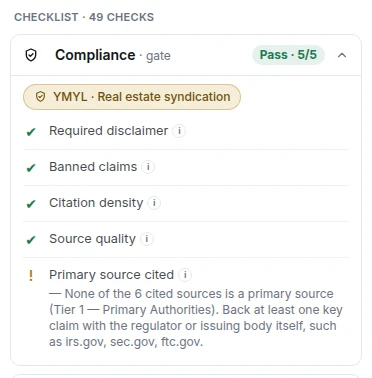
Pass and Blocked
Pass. Every compliance check cleared. Nothing is standing between you and publishing.
Blocked. At least one check failed. The specific claims are listed, each with the rule it broke and where it appears in your article.
Blocked means blocked. Publishing is genuinely prevented, not warned against.
Two tiers of blocked claim
Not every compliance flag is the same kind of problem, and Verand distinguishes them.
Hard tier: no override, ever
Unambiguous, lawsuit-class claims. Guaranteed returns or results, "can't lose" language, a missing required disclaimer, a jurisdiction violation.
These cannot be overridden by anyone, on any plan. There's no button, no escalation, no support request that unlocks them. If one of these fires, the fix is to change the content.
Review tier: overridable with a written reason
Context-sensitive claims a deterministic check can't perfectly judge. The standard example is "risk-free": in most marketing copy that's a serious problem, but a financial professional referencing the risk-free rate on U.S. Treasuries is using the term correctly and precisely.
For these, you can override, but only by writing a justification. Not a checkbox, not a dismissal. You type why this usage is legitimate, and that reason is recorded. The account owner can also do this from an AI chat, with the same rule and the reason in their own words, while "Allow AI assistants to publish and apply fixes" is on; it's recorded as an override from a chat.
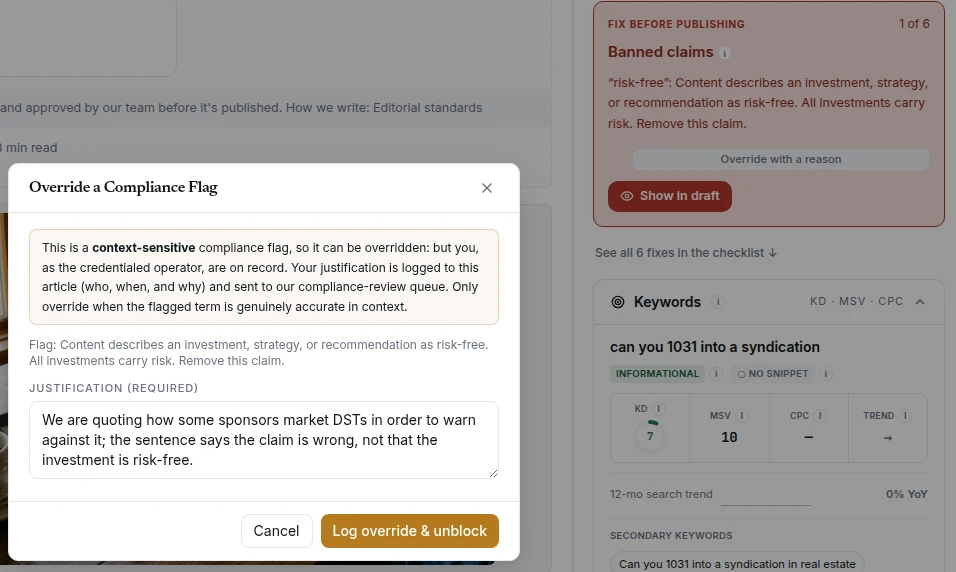
What an override actually does
Three things worth understanding before you use one:
It's permanent and attributed. Your justification is stored on the article, written to the run log, and added to an internal compliance review queue. It isn't a dismissal that disappears.
It applies to that one claim on that one article. Overriding "risk-free" in one article doesn't create a global exception. The next article is checked exactly the same way.
It improves the rules. Overrides land in a review queue precisely so genuine false positives can be fixed at the source. If a rule keeps flagging legitimate professional usage, the rule gets refined. The override is meant to be a rare exception, not a step in your workflow.
An override is a documented editorial decision by a named person, which is a very different thing from a check being switched off.
Where the rules come from
Your compliance pack is determined by the industry and jurisdiction you set during onboarding. Verand loads the rules that apply to you (securities, financial advice, legal practice, healthcare and so on) rather than a generic list.
You can see exactly which rules are loaded for your site in Brand Hub → Sources & Disclaimers. Every flag you get names the rule behind it and the regulation it comes from, so a block is never just "our system says no".
On the honesty of these packs: Researched from the regulators' own text and tested by Verand. Not reviewed by a licensed attorney. Your counsel confirms applicability. Not legal advice. Verand won't claim otherwise.
We're explicit about this because the alternative, implying a lawyer signed off when none did, is the actual liability, more so than any individual rule being imperfect.
Fixing is usually faster than overriding
Most flags take less time to fix than to justify. Open one in the Report Card and it takes you to the exact sentence that caused it. Where the fix is mechanical, there's a one-click fix, and the article is re-checked afterwards rather than assumed clear.
A missing required disclaimer is the one worth knowing about: it's a hard block, and it's usually a single click.
Override when the flag is genuinely wrong in your context. Rewrite when it isn't.
Pages you've already published
Compliance isn't only a publish-time check. Your published pages are re-checked against your current rules on every deep crawl, so if a rule changes, or a page predates the pack you're on now, anything newly flagged shows up in Issues rather than sitting unnoticed.
Two of the page-level compliance checks are advisory rather than blocking: whether a disclaimer is adequate for the claims around it, and whether results or testimonials are substantiated. Both are judged by a model rather than matched deterministically, so they flag for your review and never block on their own.
If you think a block is wrong
For a review-tier claim, override it with your reason and carry on. The queue will surface it.
For a hard-tier claim you believe is a false positive, contact support. A disputed compliance decision goes straight to a human, not a queue and not a bot, because a wrong compliance call is serious in both directions. A false block wastes your time; a false pass is the one that matters.
Include the article and the specific claim, and you'll get a person.