


 ChatGPT
 Gemini
 AI Overviews
 Perplexity
 Claude


 You
 Origin Investments
 Ashcroft Capital
Two tabs about what to write, from opposite directions.
- Topic Research: you go hunting for a topic
- Topical Map: you look at your site's structure and see where the holes are
Both end the same way: a brief, which becomes an article.
Topic Research
This is the pull surface. You come here with a question ("what should I write about X?") rather than waiting for the system to tell you.
Where topics come from
The launchpad has six ways in:
- Seed keyword: start from a phrase and expand it into topic clusters
- Related searches: the searches related to a phrase, with difficulty and volume
- People Also Ask: the questions Google shows for a topic, ready to brief
- Paste / import: bring your own list
- Competitor gap: topics competitors rank for and you don't, sortable, with the search intent of each
- GSC opportunities: queries you already appear for in Search Console but haven't targeted properly
The candidate pool
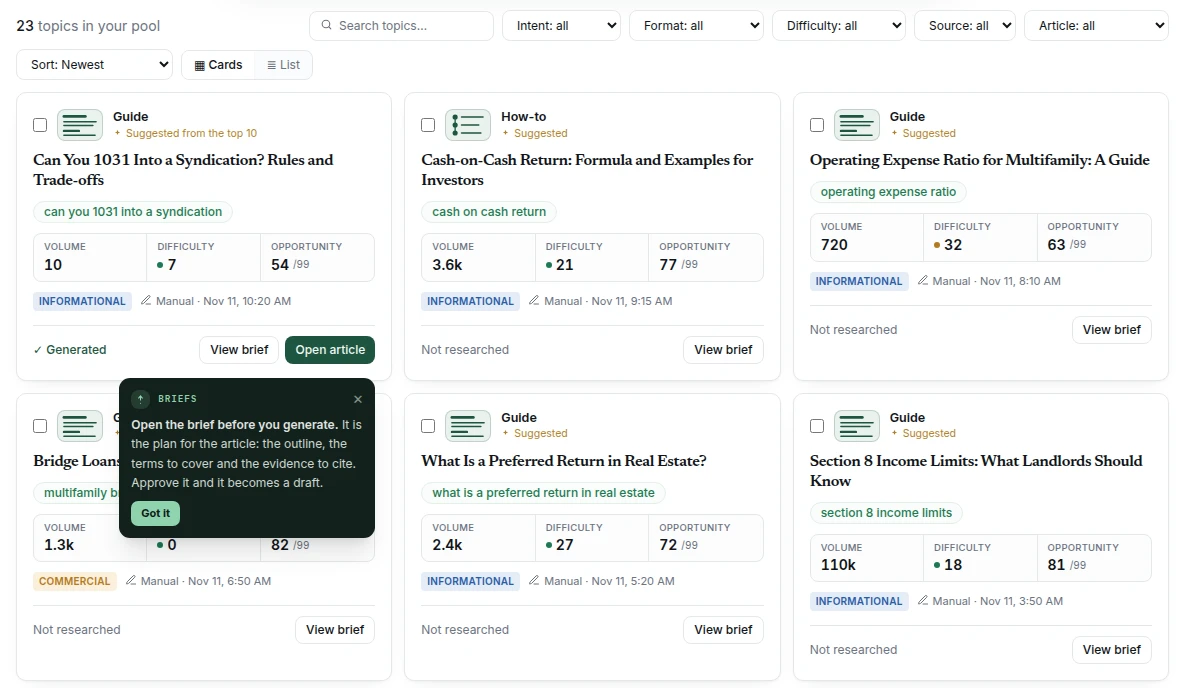
Topics you're considering collect in a pool, each carrying its real research data once research has run: keyword difficulty, monthly search volume, search intent, and whether you've already generated an article for it.
That last one matters more than it sounds. It's the check that stops you writing the same article twice, which is easy to do once you've been publishing for a few months.
Each card also shows the format the article will be written in (Guide, How-to, Comparison or List), and shows progress while its research runs.
"You already have this"
When you type a seed keyword, or paste a list to import, Verand checks each keyword against your pages' target keywords, your open drafts and the briefs in your pool. If one already targets the same search, a quiet line tells you which, with a way to open it: a page opens as a refresh, a draft opens in the editor, a brief opens in its drawer. On a pasted list, the matching rows carry a small "You have a page on this" chip.
It only speaks on an exact or near-exact match: the same words once case, punctuation, the year, small words like "the" and "for", plurals and word order are set aside, or the same words plus one more when at least three are shared. A merely related topic stays silent, because "cap rate vs cash on cash return" is a different article from "what is a good cap rate", and a nudge on it would talk you out of a real opportunity. It never blocks: research and import run either way. The check is a lookup in your own data, so it's instant and costs nothing.
Running research on a topic
Research reads the pages currently ranking for your keyword and works out what they have in common: which terms and entities recur, which facts and statistics get cited, how they're structured. That output becomes the coverage targets in your brief.
Those targets are then graded deterministically as you write. The research suggests; the checks measure. That separation is deliberate: a model proposes what to cover, but nothing model-judged ever decides your score.
The brief drawer
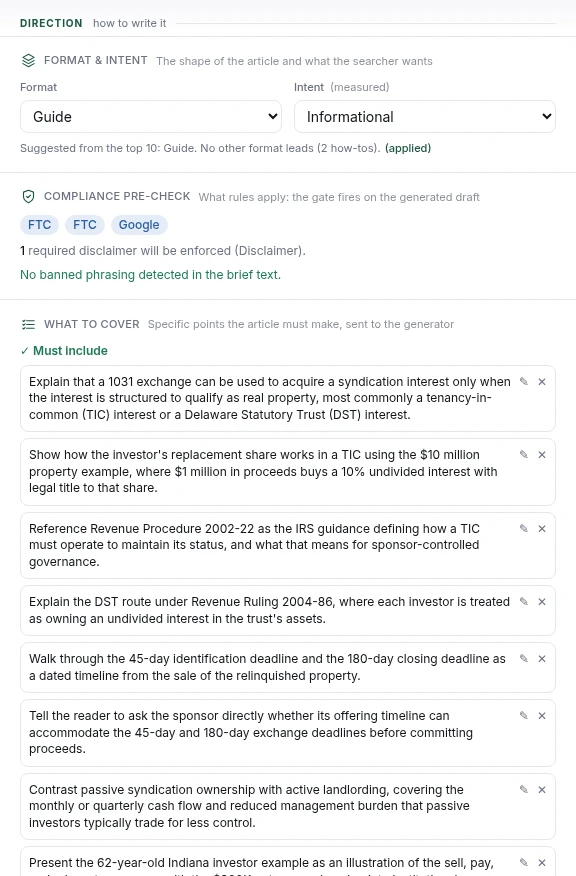
The brief is where research lands: your target keyword and its metrics, the terms to cover, the evidence to include, the questions to answer, internal links to weave in, and a compliance pre-check.
It's also where you shape the article before it's written:
- Format & intent: the article's format and what the searcher wants. Research suggests a format from the pages already ranking, or from the keyword itself, and you can change either.
- Comparison items & criteria (or List items & criteria): on a Comparison or List, the options the article covers and the criteria it judges them on. Research comparison items (or Research list items) gathers verified facts on each one.
- Hero image: Generate, Upload now, or I'll add it later. It starts on your Brand Hub setting, and a pick here applies to this article only.
- Experience to inject: short questions about your first-hand experience with the topic. Your answers feed the article. If the topic doesn't need it, the section says so.
From there it's an article.
The Topical Map
The map is your site's actual structure, read from your published pages, not a plan you fill in.
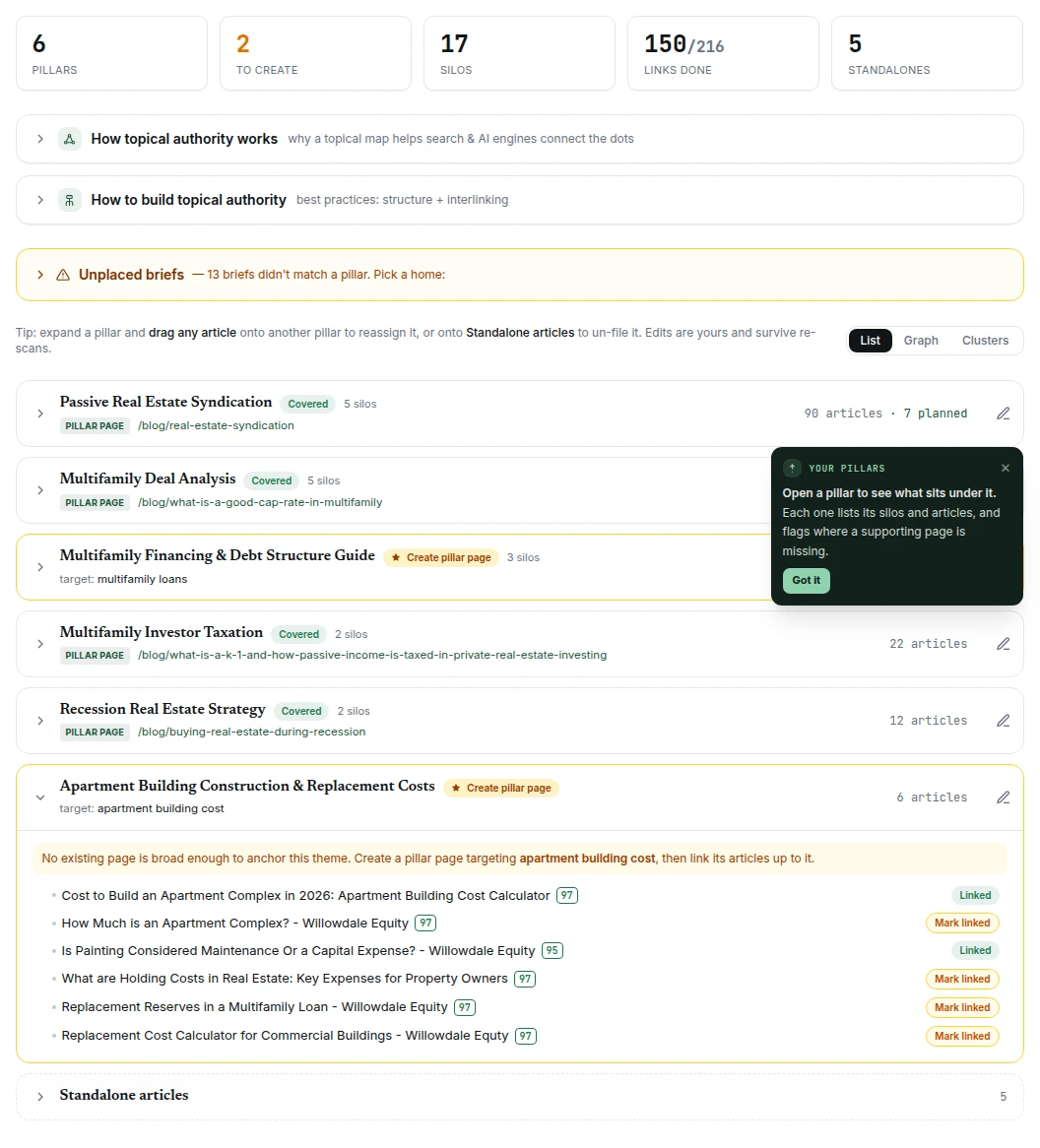
It's a tree: pillars → silos → articles. Every node is one of two things:
- Covered: a real published page sits here
- Gap: nothing exists here yet, and something should
The map is built by reading your published content and detecting the structure that's already there: which pages are pillars, which cluster under them, and how they link to each other. Then it shows you where that structure is incomplete.
Link tracking shows whether the internal links the structure implies actually exist. A silo where nothing links to the pillar isn't really a silo. It's a pile of pages Google reads as unrelated. That's the most common structural problem on a site that grew organically, and it's invisible until something draws the tree.
A brief that sits under a pillar shows on the map as Planned, alongside the live articles, until it's published. The brief's Pillar page section picks the pillar for you, and you can change it.
The map re-scans monthly as your content grows, and you can rebuild it on demand.
Correcting the map
The map is labelled Beta: the structure comes from your crawl and the pillar names are drafted by AI. When it's wrong, fix it:
- + Add pillar page makes any page on your site a pillar.
- The ✎ on a pillar renames it or changes which page heads it (Change page).
- Drag an article to another silo or pillar, or to Standalone articles.
- Unplaced briefs lists briefs the scan couldn't place, each with a recommendation: fits a pillar, start a new pillar, or standalone.
Your corrections survive re-scans. If something's off that you can't fix yourself, Send feedback under the tab title reaches us.
Which do I use?
Topical Map to answer "is my coverage of this subject complete, and does it hang together?" It's structural: it finds holes in what you've built.
Topic Research to answer "what's worth writing about?" It's exploratory: it finds things you hadn't considered.
And Opportunities answers the third question, "what should I do today?", by pushing you a ranked list instead of making you look.
A note on what's still landing
Both tabs are being extended. For new topics Verand finds on its own, see Topic ideas in Opportunities: each week it suggests articles that build on what you've already written. On the map, turning a gap node directly into a brief is still coming.
Nothing here shows you invented data. If a surface is empty, it's because there's nothing real to put in it yet.